

A digital marketing audit is a structured review of everything a business does online, from its website, search visibility and content to social media, paid ads, email and reviews, measured against its goals and its competitors. The output is a short list of what to fix, what to stop and where to put more effort, backed by evidence rather than opinion.
Most businesses run one when results stall, budgets come under pressure or a new digital marketing strategy is about to be written. This guide explains what an audit covers, when to run one and how to do it in seven steps, with a checklist, a worked example and the mistakes that make audits less useful than they should be.
What is a digital marketing audit?
The idea of a marketing audit is older than the internet. In 1977, Philip Kotler, William Gregor and William Rodgers described it in The Marketing Audit Comes of Age as a review that is comprehensive, systematic, independent and periodic. Those four qualities still separate a real audit from a quick look at the analytics dashboard:
- Comprehensive: it looks at every channel and how they work together, not only the one that is visibly struggling.
- Systematic: it follows the same sequence each time, so findings can be compared from one audit to the next.
- Independent: it is carried out by someone who did not build the campaigns being reviewed, or at least with that distance in mind.
- Periodic: it happens on a set rhythm, not only when something has already gone wrong.
A digital marketing audit applies those principles to online channels. It differs from a channel audit, such as an SEO audit or a Google Ads audit, in scope. A channel audit asks whether one channel is set up and performing well. A digital marketing audit asks whether the whole mix is doing the right jobs for the business, and whether money and time are going to the channels that earn them.
When should you run a digital marketing audit?
A full audit once a year is a sensible default, with lighter monthly and quarterly checks on performance in between. Some moments call for one outside that rhythm:
- Before writing or refreshing a marketing strategy, since every strategy starts from an honest picture of where you are now.
- When enquiries or sales fall and nobody can say which channel is responsible.
- When a new marketing lead, agency or consultant joins and needs a baseline.
- Before a website rebuild or migration, so that pages, rankings and tracking that already work are not lost.
- When budgets tighten. In the Gartner 2025 CMO Spend Survey, 59% of marketing leaders said they did not have enough budget to execute their strategy. An audit shows where existing spend is being wasted before anyone asks for more.
What does a digital marketing audit cover?
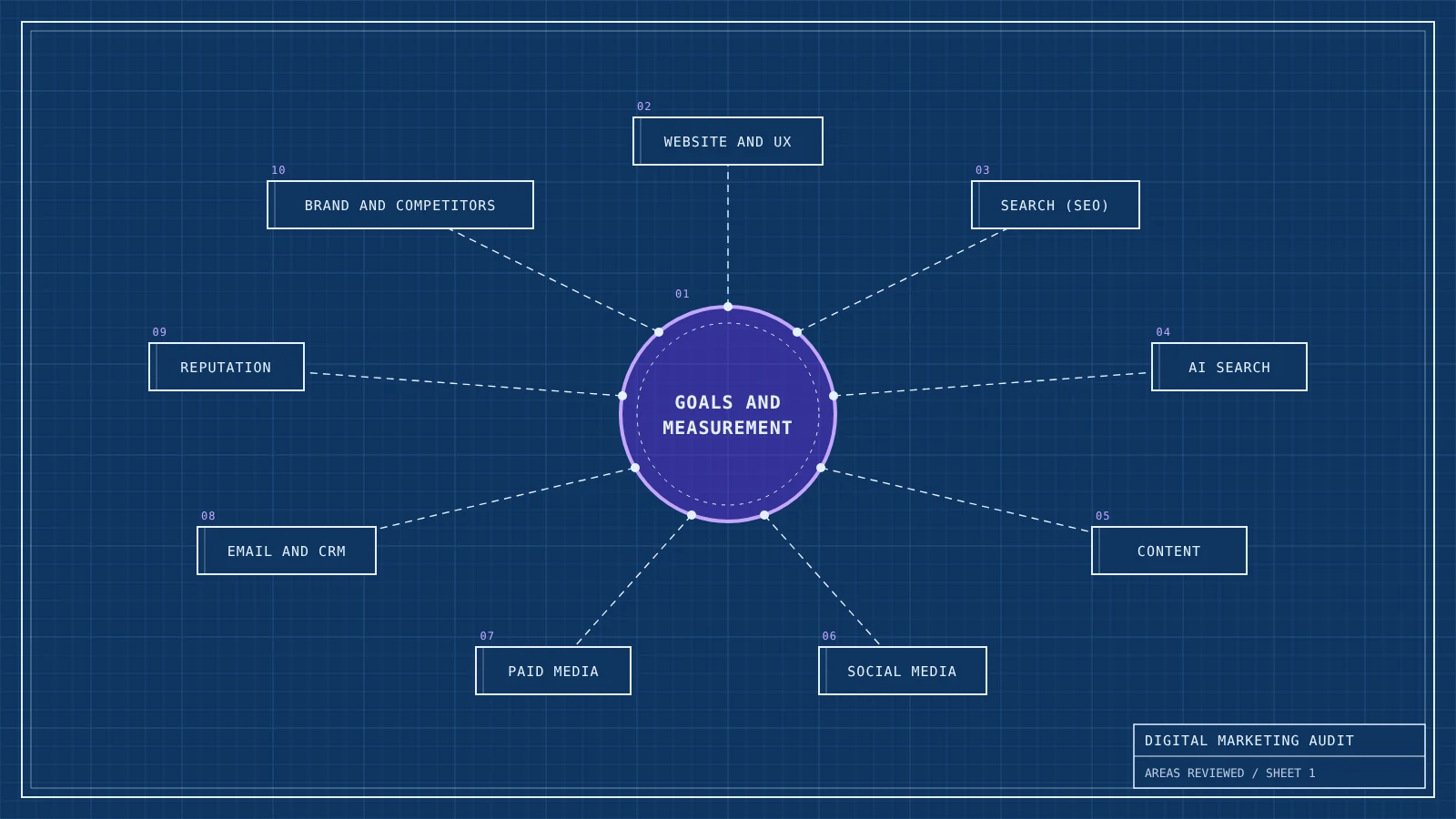
A full audit reviews ten areas. Smaller businesses may skip the ones they do not use, but measurement should never be skipped, because every other finding depends on it.
| Area | What to check | Typical red flags |
|---|---|---|
| Goals and measurement | Whether marketing goals link to business objectives and whether tracking records the actions that matter | No key events set up in GA4, enquiries counted twice, no link between ad platforms and analytics |
| Website and user experience | Speed, mobile usability, clarity of the offer, forms and checkout | Slow mobile pages, forms that fail silently, a homepage that never says who the business is for |
| Search (SEO) | Indexing, rankings, technical health and which pages bring organic traffic | Important pages not indexed, rankings only for the brand name, several pages competing for the same keyword |
| AI search visibility | Whether AI assistants mention the brand and describe it accurately | Competitors named in answers but not you, outdated or wrong descriptions |
| Content | What each piece is for, how it performs and what is missing | Old posts with outdated facts, thin pages, no content for buyers close to a decision |
| Social media | Which platforms reach the target audience and what they contribute to enquiries or sales | Accounts kept alive out of habit, reach without clicks, no tracking on profile links |
| Paid media | Spend, targeting, search terms, landing pages and return on spend | Paying for clicks on your own brand name with no reason to, broad match with no negative keywords |
| Email and CRM | List health, consent, deliverability, automations and revenue per send | A list that is only emailed during sales, no welcome sequence, missing email authentication |
| Reputation and trust | Reviews, mentions, credibility signals on the site and Google Business Profile | Unanswered reviews, wrong opening hours, no named people behind the business |
| Brand and competitors | How the brand is positioned and how rivals compete for the same customers | A message that sounds like every competitor, prices compared on the only axis where you lose |
How to run a digital marketing audit in 7 steps
The steps below work for a sole trader with a website and an Instagram account and for a company with a full marketing team. What changes is the depth of each step, not the order.
1. Set the scope and the questions
Write down the business objectives for the next year and the questions the audit needs to answer. “Why did enquiries from the website fall by a third since March?” leads to a focused audit. “Review our marketing” leads to a long document nobody acts on. Agree the time period you will analyse, usually the last 12 months compared with the 12 before, so seasonal businesses compare like with like.
2. Check the tracking before trusting the data
Many audits draw firm conclusions from broken numbers. Before analysing anything, confirm that the data is believable:
- In Google Analytics 4, check that the actions that matter, such as enquiries, calls and purchases, are marked as key events and fire once per action. Submit a test form and watch it arrive.
- Compare GA4 sales or leads with the numbers in your CRM, shop platform or inbox. A gap of a few per cent is normal. A gap of 40% means the tracking needs fixing before anything else.
- Check that campaign links carry UTM parameters, otherwise email, social and partner traffic is lumped together as direct or referral.
- Review the cookie banner and consent set-up. UK rules on cookies and similar technologies were amended by the Data (Use and Access) Act 2025, and the ICO’s guidance on storage and access technologies explains when consent is needed. Consent choices also affect how much of your traffic analytics can see, so treat raw visit counts as estimates.
3. Review each channel against its job
Give each channel a job before judging it. Paid search usually captures people who are ready to buy, social media often builds familiarity, email keeps existing customers coming back. A channel with weak last-click sales may still be doing its job well, and a channel with plenty of traffic may be doing nothing useful. Work through the areas in the table above and note, for each one, what it should be doing, what it is doing and what it costs.
A few checks that catch common problems:
- Search: the page indexing report in Google Search Console shows which pages Google has left out of its index and why.
- Website: Core Web Vitals are considered good when, for at least 75% of visits, the main content loads within 2.5 seconds, the page responds to a tap or click within 200 milliseconds and the layout shift score stays at or below 0.1, according to Google’s web.dev documentation.
- AI search: ask ChatGPT, Gemini, Perplexity and Google’s AI Mode the questions your customers ask, and record whether you appear and how you are described. The GEO guide explains how to track AI visibility over time.
- Email: if you send more than 5,000 messages a day to Gmail addresses, Google’s email sender guidelines require SPF, DKIM and DMARC authentication, one-click unsubscribe for marketing messages and a spam rate kept below 0.3%.
- Trust: an E-E-A-T checklist covers authorship, sources, company details and reviews in a few minutes per page.
4. Benchmark against competitors
Pick three to five competitors that your customers actually compare you with, which are not always the biggest names in the sector. For each, note which channels they use, what they promise, how often they publish, how many reviews they have and where they appear in search and AI answers. Plotting them on a perceptual map shows quickly whether your brand occupies a clear space or sits in the crowded middle. If it sits in the middle, the problem is brand positioning, and no amount of channel optimisation will solve it.
5. Walk the customer journey yourself
Data shows what happened. Walking the journey shows why. Search for your main service as a stranger would, on a phone. Click an ad, read a review, fill in the enquiry form, sign up to the newsletter and wait to see what arrives. Then do the same with a competitor. This is often where the most useful findings appear: a contact form that sends nothing, a confirmation email that lands in spam, a price that only appears at the final step of checkout.
6. Score and prioritise the findings
By now you will have more findings than you can act on. Score each one for impact on the business objectives and for the effort needed to fix it, then sort them into four groups:
- Quick wins (high impact, low effort): fix these first, often within days.
- Major projects (high impact, high effort): plan and budget for them, such as a site rebuild or a new content programme.
- Fill-ins (low impact, low effort): do them when there is spare capacity.
- Drop (low impact, high effort): leave them out, and say so in the report so they are not raised again next month.

7. Turn the findings into decisions
Write up the audit as a short summary followed by the evidence. The summary should fit on one page: the three to five findings that matter most, what they cost the business today and what to do about each, with an owner and a date. Everything else goes in an appendix. The findings then feed straight into the steps of building a strategy: which objectives are realistic, which channels deserve more budget and which KPIs to watch until the next audit.
Digital marketing audit checklist
Use these questions as a starting template. A “no” or “not sure” marks something to investigate.
- Does each marketing goal have a number, a date and a link to a business objective?
- Are enquiries, calls and sales tracked as key events, and do the numbers match your CRM or shop platform?
- Do you know your cost per lead or sale for each paid channel?
- Are your most important pages indexed, and do they rank for terms beyond your brand name?
- Do your key pages pass Core Web Vitals on mobile?
- Do AI assistants mention your brand for the questions your customers ask, and describe it correctly?
- Does every piece of content have a clear purpose, and has old content been updated or removed?
- Can you show what each social platform contributes beyond likes and followers?
- Is your email list growing with consent, authenticated and emailed regularly, not only during sales?
- Are reviews answered, and is your Google Business Profile accurate?
- Could a customer explain in one sentence how you differ from your nearest competitor?
- Does the enquiry or checkout journey work from start to finish on a phone?
Digital marketing audit example
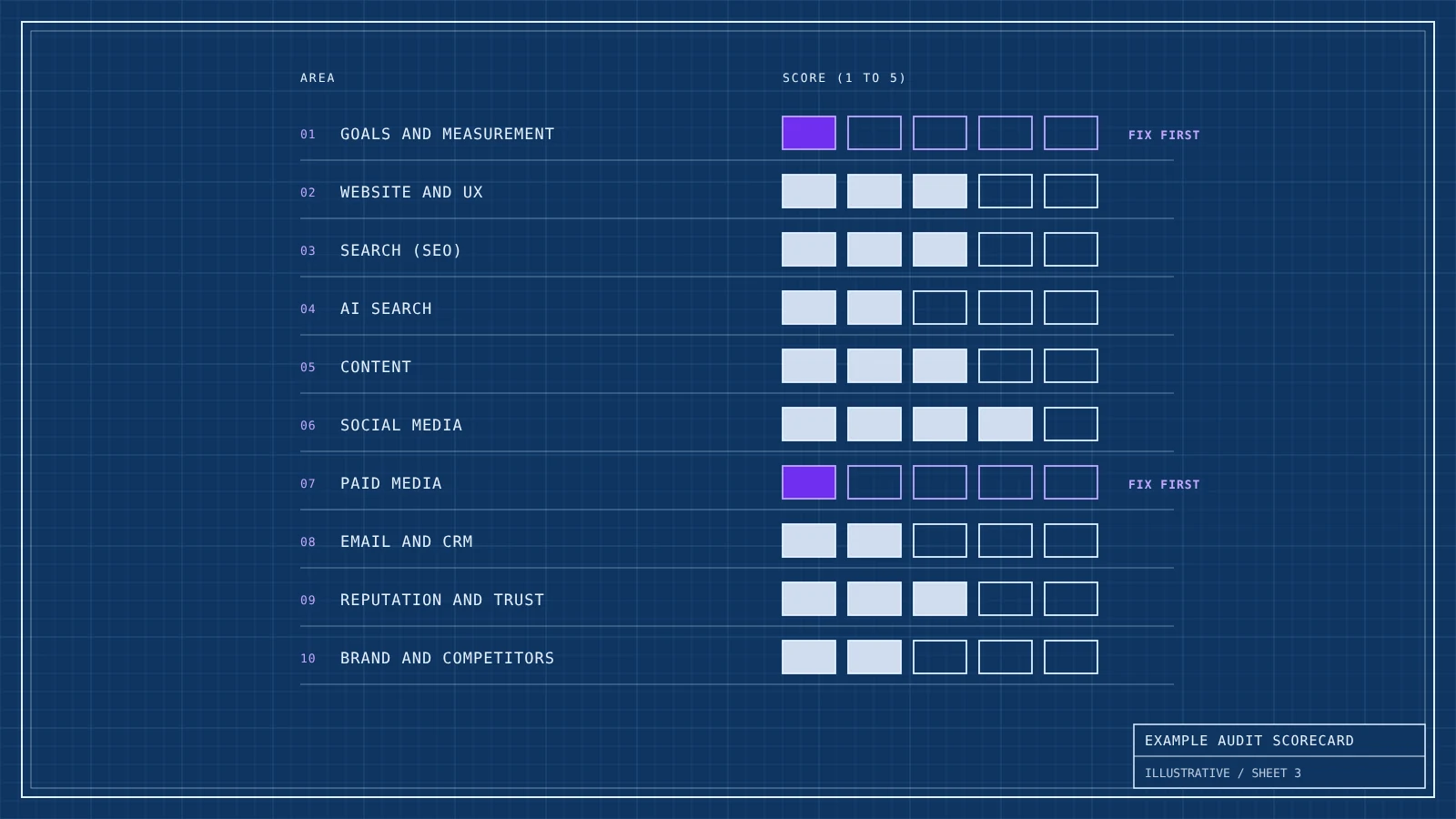
Here is an illustrative example. A family-run homeware shop in Bristol sells online and from one showroom. Online revenue has been flat for a year despite higher ad spend, and the owners want to know where the money is going. Their audit produced the findings below, already sorted by priority.
| Finding | Evidence | Action | Priority |
|---|---|---|---|
| Online sales are double counted | GA4 shows 1,900 purchases in the year, the shop platform shows 1,020 | Fix the purchase event so it fires once, then re-check all paid campaign results | Quick win |
| Over a third of paid search budget goes on the shop’s own name | The shop already ranks first for its name and no competitor bids on it | Cut brand bidding back and move the budget to product searches | Quick win |
| Instagram sales are invisible | Strong engagement, but bio and story links have no UTM tags | Tag every link and report Instagram sales monthly | Quick win |
| Product pages are slow on mobile | Largest Contentful Paint of 4.1 seconds on key product pages | Compress images and remove unused apps from the theme | Major project |
| AI assistants call the shop a budget retailer | Three of five AI tools describe it as cheap, against a premium price range | Rewrite the About page and category copy around craft and materials, and update directory listings | Major project |
| The email list is only used for sales | 6,000 subscribers, nine emails in a year, all discount codes | Add a welcome series and a monthly new-in email | Fill-in |
The headline finding was not a channel problem. The shop believed paid search was its best performer because double-counted sales made it look that way. Once tracking was fixed, its return on ad spend turned out to be well below target, and the cheapest growth was in the channels nobody was measuring.
Free audit tools vs a full digital marketing audit
Searches for a free digital marketing audit usually lead to automated tools that scan a website and return a score. They are useful for what they measure: broken links, missing title tags, slow pages, basic accessibility issues. Google’s own free tools, Search Console, PageSpeed Insights and GA4, go further and cover most of the data an audit needs.
What automated tools cannot judge is whether the marketing makes sense for the business. They will not notice that the tracking double counts sales, that the brand message sounds like every competitor or that a channel with high engagement brings no customers. Those findings need someone who understands the objectives and is willing to question how things have always been done. A sensible approach is to run the free tools first, fix what they find and then spend human time on strategy, positioning and the customer journey.
Common digital marketing audit mistakes
- Trusting the data without checking it. Broken tracking is the most common finding in any audit, and it changes every conclusion that follows.
- Auditing channels in isolation. A social account judged on last-click sales will look like a failure, even if it is the reason people later search for your brand.
- Collecting findings without priorities. A list of 80 issues with equal weight leads to the easy ones being fixed and the important ones waiting.
- Marking your own homework. The people who built the campaigns are rarely the best placed to say they are not working. Bring in a colleague from another team or an outside reviewer.
- Ignoring AI search. Ofcom found that more than half of UK adults frequently see AI summaries in search results. If the audit never asks what those summaries and chatbots say about you, it misses part of the customer journey.
- Filing the report away. An audit is only worth the decisions it leads to. Each finding needs an owner and a date, and the next audit should start by checking what happened to them.
Frequently asked questions
What is a digital marketing audit?
A digital marketing audit is a structured review of a business’s online marketing, including its website, search, content, social media, paid ads, email and reputation. It compares performance with business goals and competitors to decide what to fix, stop and invest in.
What should a marketing audit include?
It should include goals and tracking, website and user experience, SEO, AI search visibility, content, social media, paid media, email, reputation and a review of competitors and positioning. It ends with prioritised findings, each with an owner and a deadline.
How long does a digital marketing audit take?
For a small business with a few channels, a focused audit can take a few days. A larger business with many channels, markets and data sources usually needs two to six weeks, mostly spent checking data and talking to the people who run each channel.
How often should you do a marketing audit?
Run a full audit once a year and lighter performance reviews monthly or quarterly. Run an extra audit before a new strategy, a website migration or when results fall without a clear reason.
What is the difference between a marketing audit and an SEO audit?
An SEO audit checks one channel: how well a site is crawled, indexed and ranked in search engines. A marketing audit reviews every channel, how they work together and whether the overall mix supports the business’s goals.
Can I do a digital marketing audit myself?
Yes. Free tools such as Google Search Console, PageSpeed Insights and GA4 cover most of the data, and a structured checklist keeps the review consistent. An outside reviewer adds independence and is most useful for judging positioning, strategy and channel mix.
Find out what your marketing is really doing
Kutola runs independent digital marketing audits that check the data first, review every channel against its job and end with a short list of decisions you can act on. Get in touch to talk about what an audit could show for your business.