What is Google AI Mode? How it works and what it means for your website

Google AI Mode is a conversational search experience inside Google Search. Instead of a list of links, it answers in a few paragraphs with links to its sources, and lets you keep asking follow-up questions without starting again. It runs on Google’s Gemini models, sits in its own tab in Google Search and reached the UK on 28 July 2025.
This guide is for businesses that want to be among those sources. It explains how AI Mode builds an answer, what has changed for UK searchers, how it picks the pages it cites and what the research says about clicks. It then sets out the work that makes a site more likely to be cited and how to track the results. AI Mode is one of the AI search surfaces covered by generative engine optimisation, and most of that groundwork applies here too.
What is Google AI Mode?
AI Mode turns a Google search into a conversation. You open it from the AI Mode tab or button, ask a question in your own words and get a written answer with links to supporting pages. Each follow-up question builds on the previous one, so a search such as “best bike for a 12-mile commute” can carry on with “what if I want to carry a child seat?” without repeating the details. You can also start with a photo or speak your question.
Google launched AI Mode in the US in May 2025, and a year later said it had passed one billion monthly users worldwide, with queries more than doubling every quarter and more than one in six searches starting with something other than text, such as an image. Since early 2026 the two AI features have also been joined up: a follow-up question asked under an AI Overview now continues as a conversation in AI Mode, which Google expanded in its I/O 2026 Search update.
AI Mode is often confused with two other Google products. An AI Overview is the short summary that appears on its own above normal results, and there is a side-by-side comparison of AI Overviews and AI Mode in the AI Overviews guide. The Gemini app is a general assistant for writing, planning and other tasks. AI Mode is part of Search: it answers from Google’s index and links out to the websites it draws on.
How does AI Mode work?
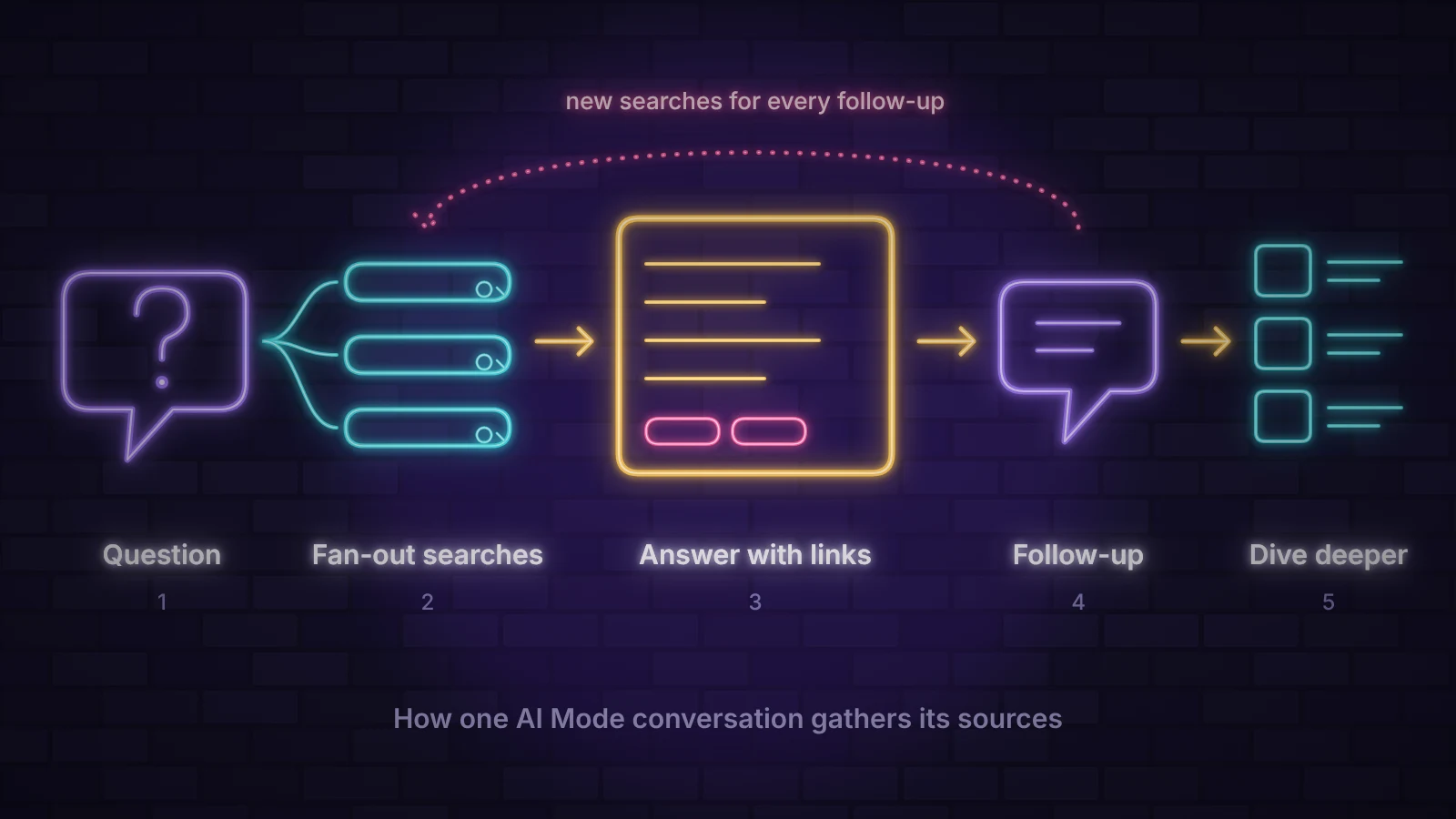
When you ask AI Mode a question, it does not run one search. Google’s documentation on AI features and your website says it may use query fan-out, issuing several related searches across subtopics and data sources, then writing one answer from what they return. The same technique powers AI Overviews, and the guide to how AI Overviews work shows fan-out in more detail. Three things make AI Mode different.
- The conversation carries context. Every follow-up starts a fresh round of searches that takes earlier questions into account, so the sources change as the conversation moves from “what is it” to “which one” and “how do I book”.
- It can go much deeper. For research-heavy questions, Deep Search runs far more searches and builds a fully cited report. Google’s Head of Search, Liz Reid, described it as “the same query fan-out technique but taken to the next level”.
- It can act as well as answer. Some tasks now end inside AI Mode rather than on a results page. Restaurant booking is the clearest UK example, covered in the next section.
AI Mode in the UK
The UK was one of the first countries outside the US to get AI Mode. It rolled out on 28 July 2025 as a tab on desktop results and in the Google app on Android and iOS, without the Labs sign-up that early US users needed. Since then, three changes matter most for UK businesses.
| Date | Change | Who it affects most |
|---|---|---|
| April 2026 | Restaurant booking in AI Mode: it finds tables that match the time and party size you ask for, with links to finish the booking through eight UK platforms including OpenTable, TheFork and ResDiary | Restaurants, bars and other venues that take bookings |
| October 2026 | More and higher links in AI Mode and AI Overviews, a more clickable Dive deeper section with thumbnails and a test of a section that points to the official site for a task | Every site that wants clicks from AI answers |
| Q4 2026 | Ads in AI Mode are due to reach the UK, after ten other markets in October. When AI Mode first arrived here, Google said it would carry no ads | Advertisers, and organic sites that will share the answer with ads |
The UK rules around AI Mode are also changing. Since 31 August 2026, any site can remove itself from AI Mode and AI Overviews with one setting in Search Console, following the Competition and Markets Authority’s requirements for Google. The options and their trade-offs are covered in whether you can opt out of AI Overviews, and for most businesses staying in is the better choice.
How AI Mode chooses its sources
To be eligible at all, a page has to be indexed and allowed to show a snippet in Google Search. Google says there are no other technical requirements and no special markup or file for AI Mode, which is also why Google does not read LLMs.txt. Eligibility is only the entry ticket, though. Which pages get cited depends on the sub-questions the fan-out produces.
That is why ranking first for a keyword does not guarantee a place in AI Mode. In SE Ranking’s AI Mode research, only 14% of the URLs AI Mode cited also appeared in Google’s organic top 10 for the same query, rising to 21.9% when matching by domain. AI Mode also cites different pages from AI Overviews. An Ahrefs comparison of answers to the same queries found the two features reached very similar conclusions, with 86% semantic similarity, yet only 13.7% of their citations overlapped.
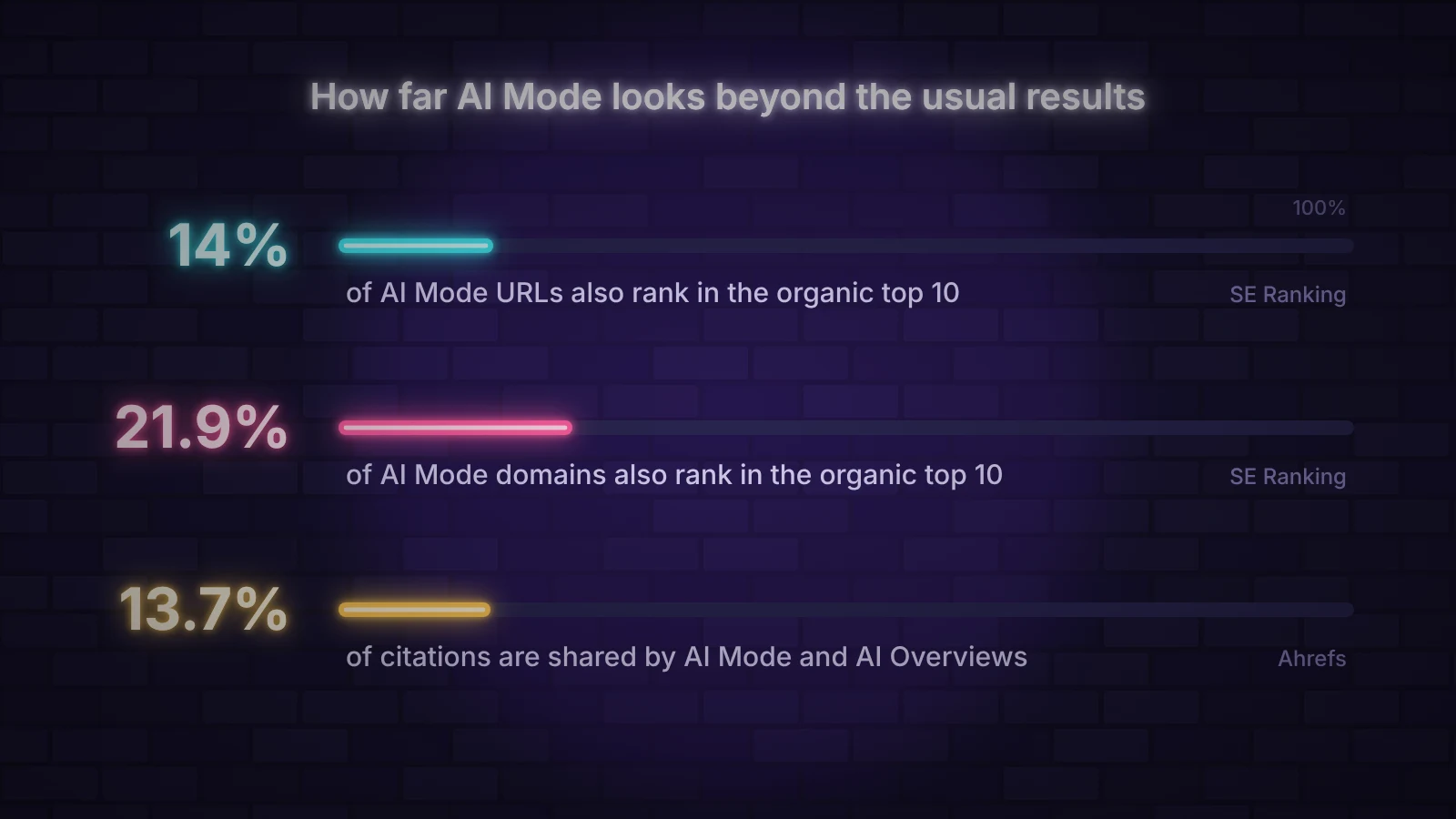
The pattern is consistent across studies: AI Mode looks beyond the pages that rank for the typed query and picks the clearest answer to each part of the question. A page that ranks on page two for the main keyword can still be cited because it answers one sub-question better than anyone else.
What AI Mode means for website traffic
AI Mode sends far fewer clicks than a normal results page, because the answer is the page. Semrush’s clickstream analysis of US desktop sessions from May to July 2025 found that around 92 to 94% of AI Mode sessions ended without a visit to another website. That makes AI Mode one of the clearest cases of zero-click search, a step beyond the drop in clicks that comes with an AI Overview.
The figures come from AI Mode’s first months, and Google has since added more inline links, placed them higher and made the Dive deeper links easier to click. Google has not published click data for those changes. The safest assumption is that AI Mode will send fewer but better informed visitors. Someone who clicks after a ten-minute conversation has already compared options and often arrives ready to enquire or buy.
Being cited still has value when nobody clicks. Your brand is named in the answer, often next to competitors, at the moment someone is deciding. Over time that shows up as more branded searches and direct visits, which is why AI search is better judged on leads and enquiries than on sessions alone.
How to get your site cited in AI Mode
The fundamentals are the same as for appearing in AI Overviews: an indexable page, a direct answer under each heading, visible evidence and up-to-date facts. AI Mode adds a different starting point. You are planning for a conversation, not a single query.
- Check that your key pages can be used. Confirm in Search Console that they are indexed and that no nosnippet rule or blocked crawler keeps them out. The AI Readiness Checker scores a page on crawler access, structure, structured data and trust signals, and lists what to fix.
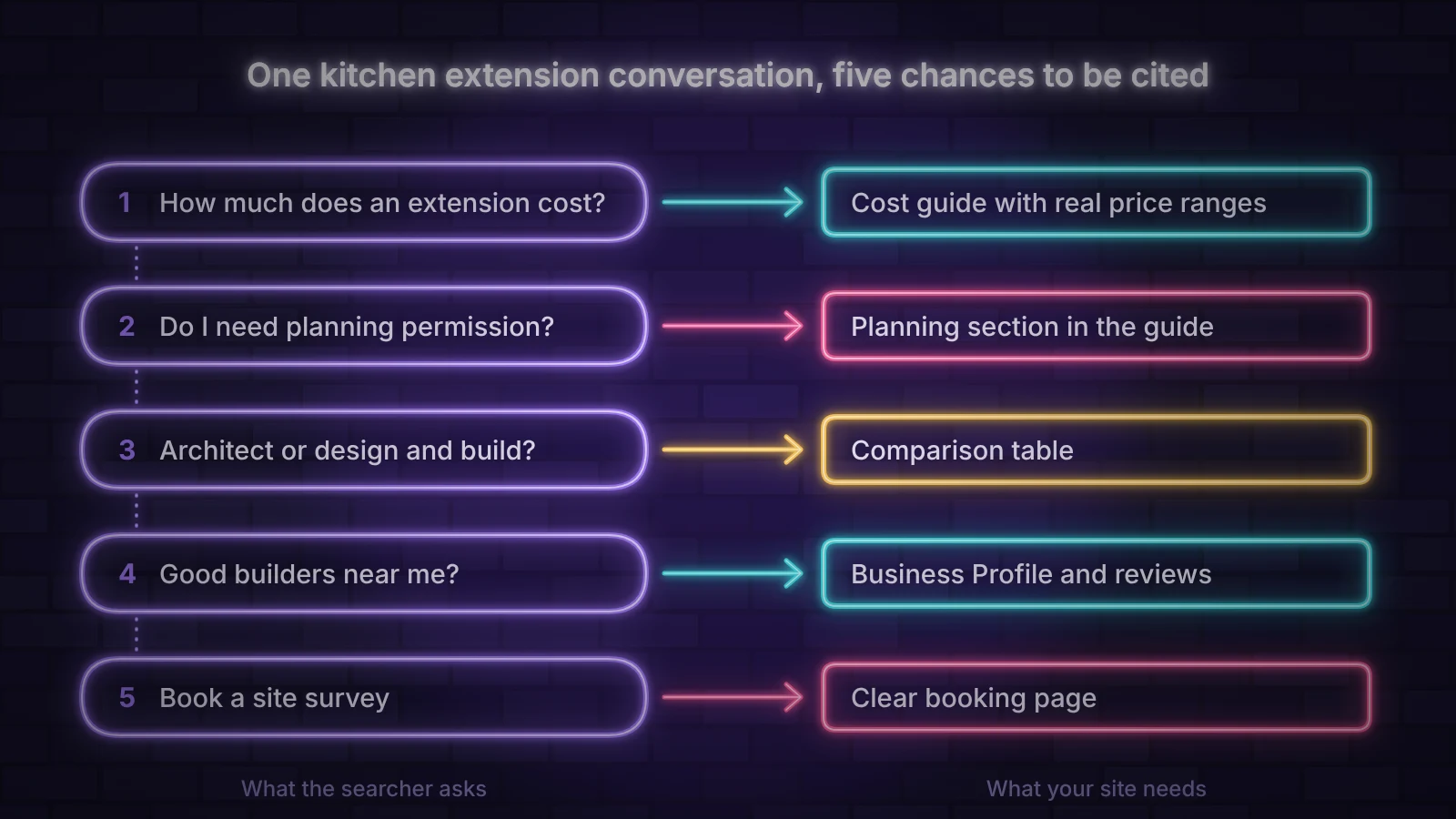
- Map the conversation, not just the keyword. Write down the five or six questions a buyer asks in order, from the first “how much” to the final “who can do it”. Use People also ask, your sales calls and the follow-ups AI Mode itself suggests, as described in keyword research for AI search.
- Give each question a clear home. Make sure every step of that conversation is answered somewhere on your site, either as a section of a guide or as its own page. A cost question needs real price ranges and what changes them. A comparison question needs a table.
- Make your task pages unmistakable. Google is testing a section that points to the official place to complete a task, and AI Mode already hands off bookings to partner platforms. Pricing, booking, contact and support pages should state plainly what they offer, and any booking or ordering partner you use should have current information.
- Keep your business facts consistent. Opening hours, services, prices and locations should match across your website, Google Business Profile and product feeds. Local and shopping answers can draw on this information, and conflicting details give AI Mode a reason to pick someone else.
- Show up beyond your own site. AI Mode’s citations reach well past the top 10, into videos, forums, reviews and social posts. Genuine answers on those platforms give you more ways in, which is why social media SEO now feeds AI search.
The trust signals of E-E-A-T matter more as the conversation gets closer to a decision. Named authors, real examples, reviews and clear company details help AI Mode treat your page as a safe source for a recommendation, especially on money, health and legal topics.
How to track AI Mode visibility
Search Console counts AI Mode clicks and impressions in the standard Performance report under the Web search type, and the generative AI report shows how often your pages appeared. Neither separates AI Mode from AI Overviews, and the generative AI report shows impressions without clicks. Both Search Console reports for AI features are explained in full in the AI Overviews guide.
To see AI Mode on its own, test it by hand. Take the conversation you mapped above, run it in AI Mode in a private window once a month and record which sources are cited at each step, including competitors. Watch branded search and direct traffic in Search Console and your analytics alongside it, because a rise in either is often the first sign that AI answers are naming you.
Frequently asked questions
What is Google AI Mode?
Google AI Mode is a conversational search feature in Google Search. It answers questions in a written response with links to its sources, lets you ask follow-up questions and runs on Google’s Gemini models. It has been available in the UK since July 2025.
How is AI Mode different from AI Overviews?
An AI Overview is a short summary that appears automatically above normal results. AI Mode is a separate tab you choose, where the whole page becomes a conversation with longer answers and follow-up questions. The two often cite different pages.
Is Google AI Mode the same as Gemini?
No. Both use Google’s Gemini models, but AI Mode is part of Google Search and answers from Google’s index with links to websites. The Gemini app is a general assistant for tasks such as writing, planning and analysis.
How do I get my website to show up in Google AI Mode?
Make sure your pages are indexed and eligible for a snippet, then answer every question a customer asks on the way to a decision, with clear task pages and consistent business details. Google says there is no special markup or file for AI Mode.
Does AI Mode reduce website traffic?
Usually, yes. A Semrush clickstream study found that around 92 to 94% of early AI Mode sessions ended without a visit to another website. Those who do click tend to arrive later in their decision.
Can I keep my site out of AI Mode?
Yes. The Search generative AI setting in Search Console removes your site from AI Mode and AI Overviews without affecting regular rankings. Page-level controls such as nosnippet and data-nosnippet limit what can be used.
On this page
Back to topBe part of the conversation
AI Mode rewards businesses that answer every step of a customer’s decision, not just the first search. Kutola helps you map those conversations, fill the gaps on your site and track where AI answers mention you. Get in touch to see which questions you could be answering.