Google AI Overviews: how they work and how to get cited in them

Google AI Overviews are the AI-written summaries that appear above the regular results on many Google searches. Each one answers the question in a few short paragraphs or a list, with links to the web pages it drew on. They are the most visible part of generative engine optimisation for most businesses, because Google is still where most people in the UK search.
This guide explains how AI Overviews choose their sources, when they appear, how they differ from AI Mode and what the research says about clicks. It then covers the steps that make a page more likely to be cited, how to track your visibility in Search Console and the controls you have if you would rather stay out.
What are Google AI Overviews?
An AI Overview is a generated answer at the top of a Google results page. It sits where a featured snippet once did, but instead of quoting one page it combines information from several and shows them as supporting links beside or beneath the text. A searcher can expand the summary, open a source or carry on scrolling to the usual results.
Google launched the feature in the US in May 2024 and brought it to the UK in August 2024, after a small UK test earlier that year. It now runs in more than 200 countries and territories and over 40 languages, according to Google’s 2025 expansion announcement. At its 2026 developer conference Google said AI Overviews have more than 2.5 billion monthly users, which makes them the AI search product most people actually see.
How do AI Overviews work?
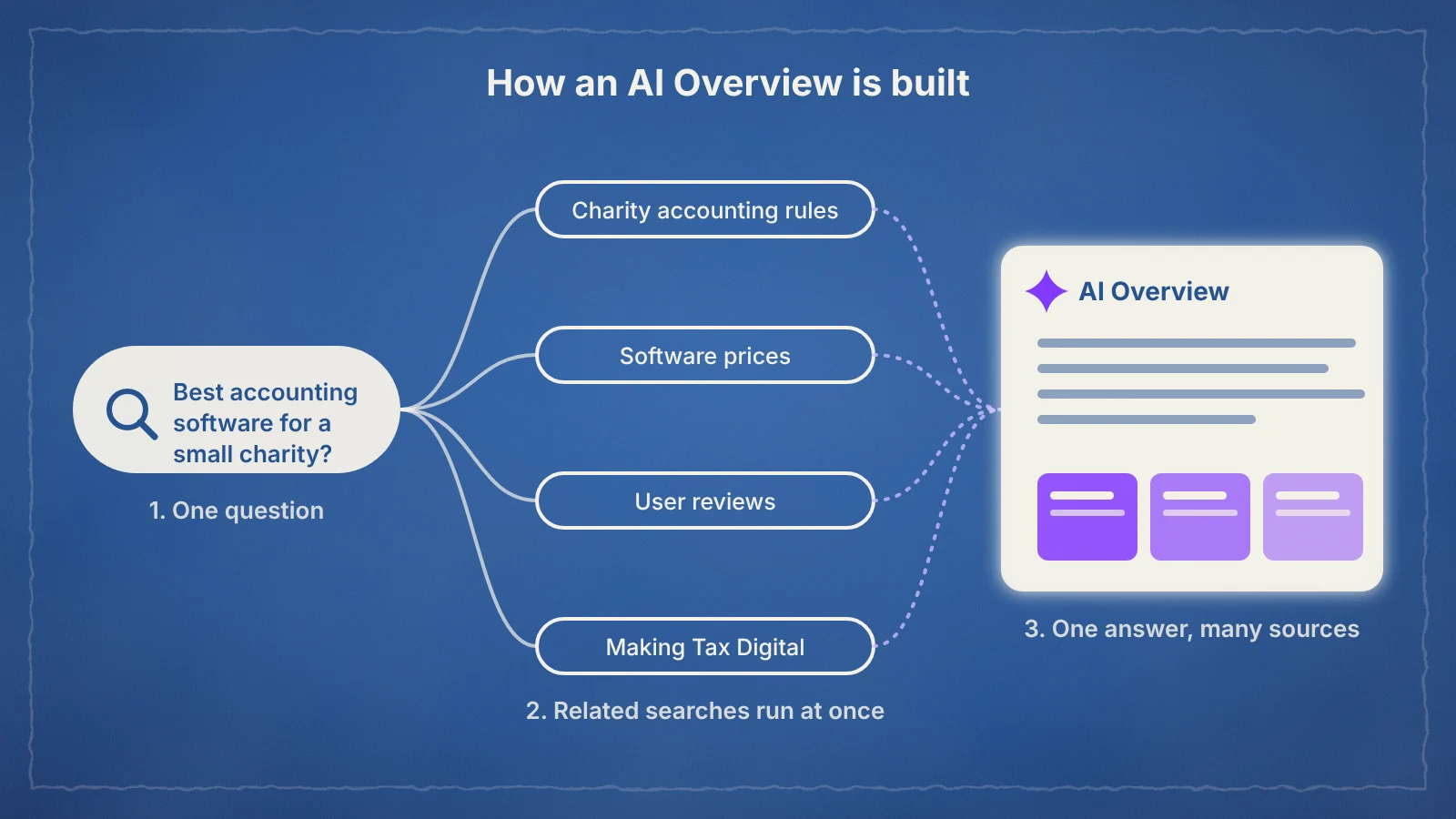
AI Overviews are written by a customised Gemini model that works with Google’s core ranking systems rather than answering from training data alone. Google described this set-up when it introduced the feature, saying the summaries are designed to show information backed up by top web results. In practice, the model reads pages from Google’s index and writes an answer from them.
For complex questions, Google uses query fan-out. The system runs several related searches across subtopics at once and pulls supporting pages for each one. Google’s guide to AI features and your website says this lets an AI Overview show a wider and more varied set of links than a classic results page. It also means a page can be cited for a sub-question even when it does not rank for the query the searcher typed.
The answers are not always right. Google’s own help page for AI Overviews says they can and will make mistakes. In January 2026, after a Guardian investigation found misleading summaries for liver blood test ranges, Google removed AI Overviews from some of those medical searches. Health, money and legal topics, the YMYL categories, are where accuracy matters most and where Google is most cautious.
When do AI Overviews appear?
Google shows an AI Overview when its systems judge that a generated answer will be especially helpful, which usually means informational questions, comparisons and searches with several parts. Simple navigational searches, such as a brand name followed by “login”, rarely need one.
How often that happens depends on what people search for. Ofcom’s 2025 Online Nation research found that around 30% of searches in the UK now show an AI overview, and 53% of adults say they often see them. In the US, a Pew Research Center study of real browsing data from March 2025 found AI summaries on 18% of Google searches, rising to 60% for searches phrased as questions starting with words such as “who”, “what” or “why”.
The quickest way to see your own exposure is to search your ten most important informational queries in a private window and note which ones trigger a summary and which sites it cites.
AI Overviews vs AI Mode
The two features use the same technology but sit in different places. An AI Overview is a summary inside the normal results page. AI Mode is a separate tab where the whole page becomes a conversation, and Google says it passed one billion monthly users in its first year.
| AI Overviews | AI Mode | |
|---|---|---|
| Where it appears | Above the regular results on a normal search | In its own tab, replacing the list of results |
| When it appears | Automatically, when Google judges it helpful | When the searcher chooses it |
| Format | A short summary with supporting links | A longer answer with follow-up questions in a chat |
| Typical use | Quick answers and overviews | Research, comparisons and multi-step questions |
| Eligibility for links | Indexed and eligible to show with a snippet in Search, with no extra requirements | |
| Reporting | Counted together in Search Console | |
Because eligibility and reporting are shared, the same work improves your chances in both. The difference is mostly in the questions: AI Mode attracts longer, more detailed prompts, so depth matters even more there.
How AI Overviews affect clicks
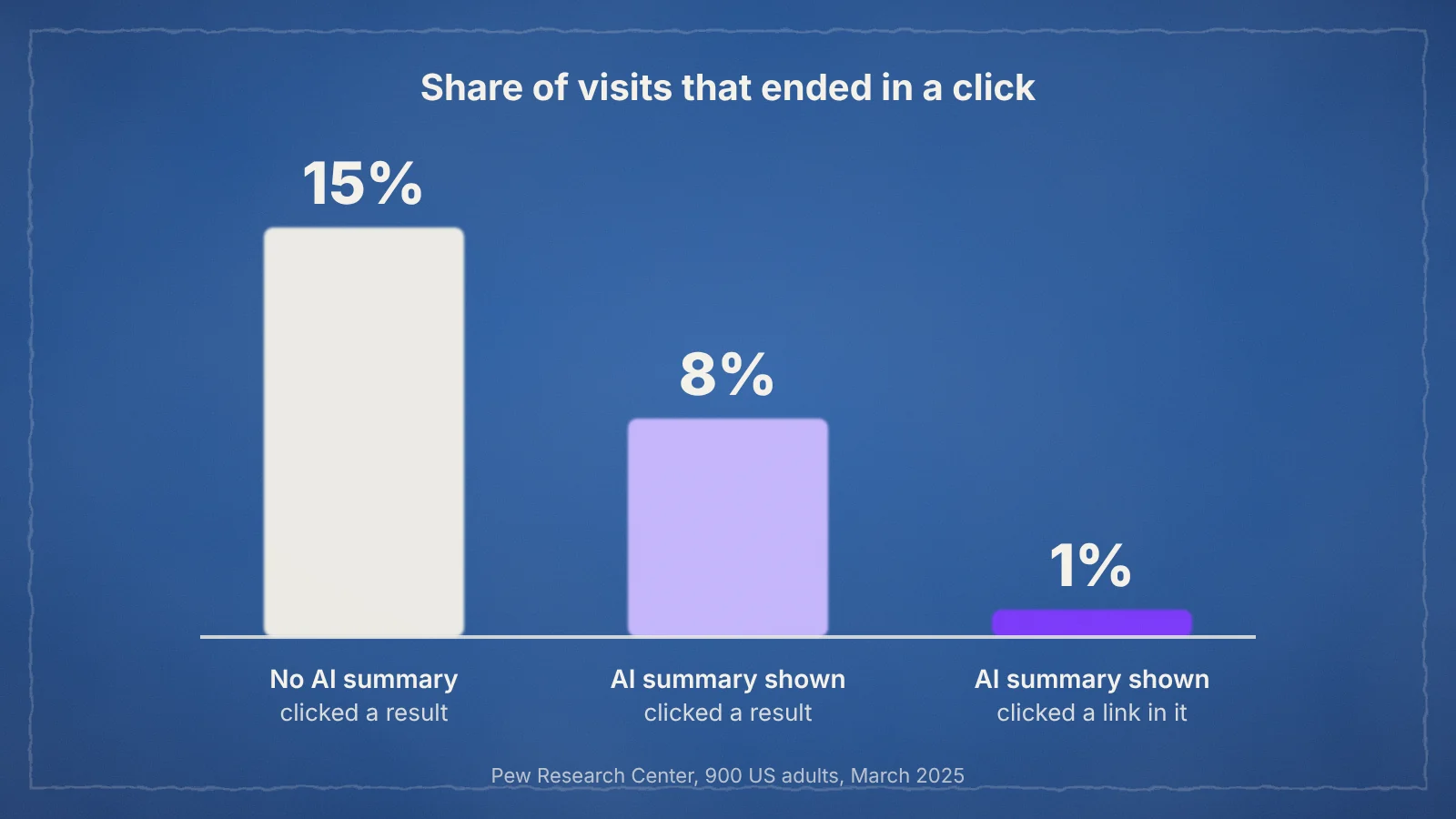
When an AI Overview answers the question, fewer people click through. In the Pew study, users who saw an AI summary clicked a traditional result on 8% of visits, against 15% when there was no summary. They clicked a link inside the summary itself on only 1% of visits. Ahrefs’ analysis of 300,000 keywords found that an AI Overview was associated with a 58% lower click-through rate for the page in position one, 51% lower in position two and 19% lower in position ten.
Google presents a different side. Its guidance says clicks from results pages with AI Overviews tend to be higher quality, with visitors more likely to spend time on the site. Both can be true: fewer people click, and those who do have already read a summary and arrive further along.
This changes what counts as success. Many informational searches are now zero-click searches, so being named as a source builds familiarity even when no visit follows. Track impressions and citations alongside traffic, and judge content on the leads and sales it supports, as covered in the section on SEO strategy for AI search.
How to appear in AI Overviews
Google says there is no special markup, file or setting that gets a page into AI Overviews. Its guide to optimising for generative AI features points back to SEO fundamentals instead. These six steps put those fundamentals in the order that matters for AI Overviews.
- Make sure the page is indexed and can show a snippet. Check it with the URL Inspection tool in Search Console. A noindex tag or a nosnippet rule keeps a page out of AI Overviews, and so does turning off the Search generative AI setting described below. An SEO audit catches these problems across the whole site.
- Answer the question straight after the heading. Put the direct answer in the first one or two sentences of each section, then add detail. Use headings that match how people ask, and lists or tables where the content is genuinely a list or a comparison.
- Cover the follow-up questions. Query fan-out rewards pages that answer the next question too. If you explain what a service costs, also cover what affects the price and how to compare quotes. Each well-answered section is another chance to match a sub-search.
- Show evidence and who is behind it. Name your sources, use specific figures and make the author’s expertise visible. These are the signals of E-E-A-T that Google’s quality systems look for, and they carry most weight on YMYL topics.
- Keep key pages accurate and current. Update prices, statistics and rules when they change, and show the date you last reviewed the page. An outdated page can be cited with wrong information, which is worse than not being cited at all.
- Be present where Google finds sources. Pew found that Wikipedia, YouTube and Reddit were the sources AI summaries cited most often, together making up 15% of all citations. Useful videos and genuine answers in communities give you more routes into the summary, which is why social media SEO now feeds AI search.
Some tactics are worth ignoring for Google. You do not need llms.txt or other AI text files, special schema or content cut into tiny chunks for AI Overviews. Structured data still helps search engines understand a page, but it is not a ticket into the summary.
How to track AI Overview visibility
Google Search Console is the starting point. Clicks and impressions from AI Overviews and AI Mode are included in the standard Performance report under the Web search type. Since 31 August 2026, every site also has a generative AI performance report that shows how often your pages appeared in these features, broken down by page, country, device and date.
The report has limits. It counts impressions rather than clicks, it does not show the queries behind each appearance and it combines AI Overviews with AI Mode. Three other checks fill the gaps:
- A fixed list of test queries. Search the same 20 to 30 questions each month and record whether an AI Overview appears, whether you are cited and which competitors are.
- Page-level traffic trends. Compare impressions and clicks for pages whose queries now trigger summaries. Rising impressions with falling clicks usually means the summary is answering the question.
- Branded search. People who meet your name in a summary often search for it later, so growth in branded queries is an indirect sign of visibility.
Dedicated AI visibility tools can automate the test queries at scale and cover other assistants too, which suits larger sites.
Can you opt out of AI Overviews?
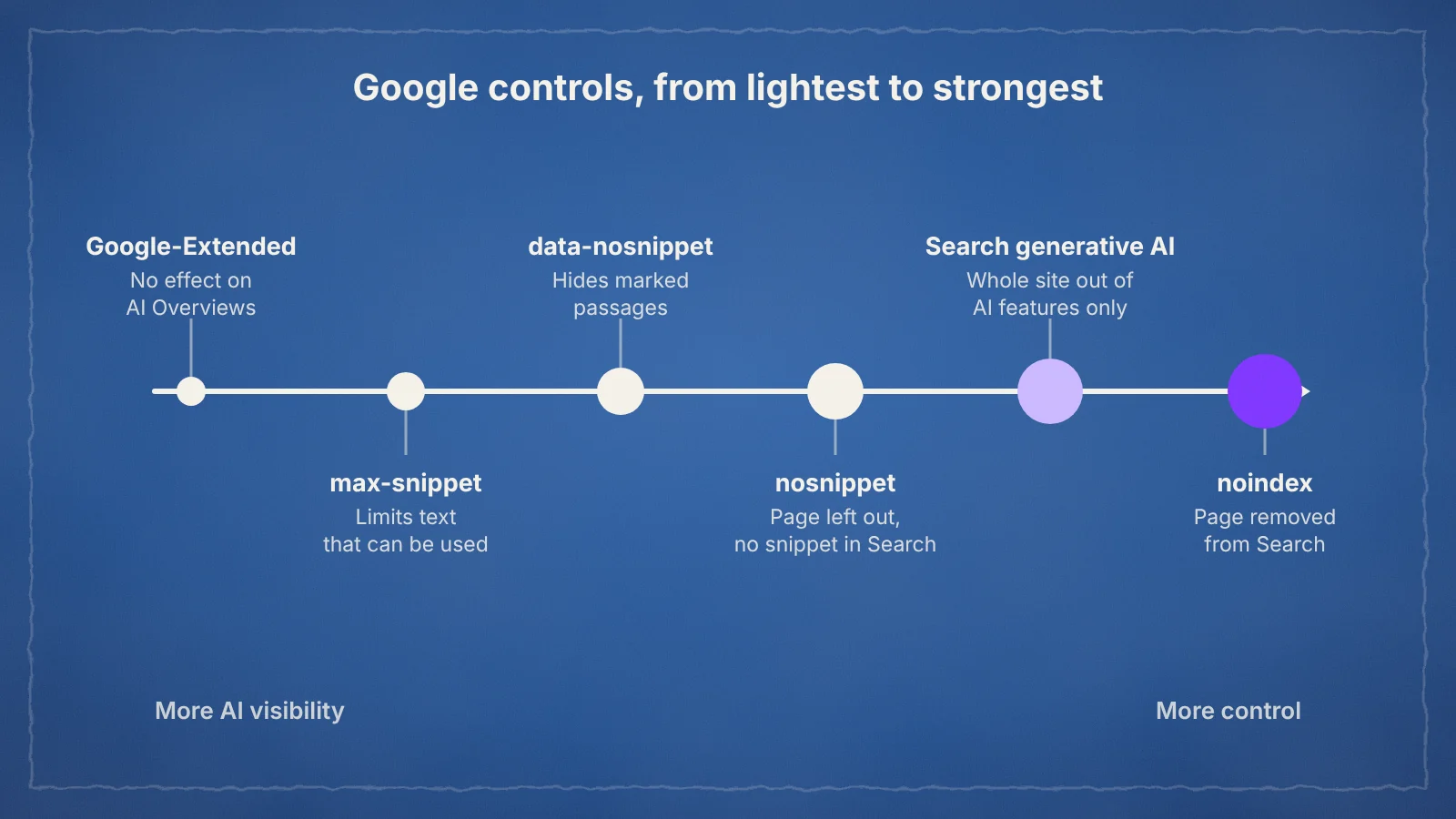
Yes. Search Console now has a Search generative AI control under Settings, available to all sites since 31 August 2026. Turning it off removes the site from AI Overviews, AI Mode and generative features in Discover, and stops its content being used to generate those answers. Google says the setting is not used as a ranking signal for the rest of Search.
The control follows a UK ruling. In June 2026 the Competition and Markets Authority required Google to give publishers effective tools to keep their content out of its AI features, to attribute content with clear links and not to penalise sites that use the opt-out. Older controls still work at a finer level:
| Control | Effect on AI Overviews | Effect on regular results |
|---|---|---|
| Search generative AI setting | Whole site removed | None |
| nosnippet | Page not used | No text snippet shown |
| data-nosnippet | Marked text not used | Marked text not shown in snippets |
| max-snippet | Limits how much text can be used | Shorter snippets |
| noindex | Page not used | Page removed from Search |
| Google-Extended | None | None; it only covers Gemini training and grounding outside Search |
For most businesses, opting out costs more than it saves. Competitors stay in the summaries and keep shaping how your category is explained. It makes more sense for publishers whose income depends on people reading the full article, and they should test it on part of the site first.
Frequently asked questions
How do I get my website into Google AI Overviews?
Make sure your pages are indexed and eligible to show a snippet, then answer questions clearly near the top of each section, cover the likely follow-up questions and back your claims with evidence. Google says there are no extra technical requirements beyond normal SEO.
Can I stop Google using my site in AI Overviews?
Yes. The Search generative AI setting in Search Console removes your whole site from AI Overviews and AI Mode without affecting regular rankings. For single pages or passages, use the nosnippet, data-nosnippet or max-snippet controls.
Do AI Overviews reduce website traffic?
Usually, for informational searches. Pew Research Center found that people clicked a regular result on 8% of visits with an AI summary compared with 15% without one. Pages cited in the summary gain visibility even when fewer people click.
What is the difference between AI Overviews and AI Mode?
AI Overviews are short summaries that appear automatically above normal Google results. AI Mode is a separate tab the searcher chooses, where Google answers in a longer, conversational format with follow-up questions.
Are Google AI Overviews accurate?
Mostly, but not always. Google’s help page says they can make mistakes, and Google removed some health summaries in January 2026 after a Guardian investigation. Check important information, especially on health, money and legal topics, against the cited sources.
On this page
Back to topFind out where you stand in AI search
A quick check of how ready your pages are for AI answers, from crawler access to structure and trust signals, shows where to start. Kutola helps businesses plan SEO and AI search work that earns citations in Google and beyond. Get in touch to see which of your key questions you could be answering.