SEO audit: a step-by-step checklist for your website
An SEO audit is a structured check of how well search engines can find, crawl, index and rank a website, and of what is holding it back. It covers technical health, on-page elements, content quality and links, and it now also asks whether AI search tools can reach and cite the site. The result should be a prioritised list of fixes, not a score.
An audit is usually the first step in building an SEO strategy, because you can only plan from an honest picture of where the site stands. This guide explains what an SEO audit covers and which free tools you need, then walks through eight steps to run one yourself, from Search Console data to structured data and links. It also covers the AI search checks most audits still miss, a checklist and when an SEO audit service is worth paying for.
What is an SEO audit?
An SEO audit answers three questions. Can search engines find and read your important pages? Do those pages match what people are searching for? And does the rest of the web trust the site enough to rank it? Most audits split those questions into five areas:
| Audit area | What it checks | Typical finding |
|---|---|---|
| Technical SEO audit | Crawling, indexing, site structure, redirects, speed, mobile experience, HTTPS and structured data | Service pages blocked by robots.txt after a redesign |
| On-page audit | Title tags, meta descriptions, headings, internal links and images | Twenty pages sharing the same title tag |
| Content audit | Whether each page answers its query and is accurate, original and up to date | Three blog posts competing for the same keyword |
| Off-page audit | Backlinks, brand mentions and reviews | Most links point to old URLs that now return a 404 error |
| Local SEO audit | Google Business Profile, reviews and consistent business details across directories | An old address still listed on major directories |
The technical SEO audit is the part most people mean when they ask for an SEO audit, and it is the one to run on its own before a redesign or a move to a new platform. A full audit covers all five areas. It is narrower than a digital marketing audit, which reviews every channel and how they work together, while an SEO audit looks at organic search in depth.
Free SEO audit tools
You can run a thorough audit without paying for software. These tools cover almost every step in this guide:
| Tool | What it does in an audit | Cost |
|---|---|---|
| Google Search Console | Clicks and queries, page indexing, Core Web Vitals, links and manual actions, straight from Google | Free |
| PageSpeed Insights | Real user and lab speed data for any single URL | Free |
| Screaming Frog SEO Spider | Crawls the site like a search engine and lists broken links, redirects, titles, canonicals and page depth | Free up to 500 URLs, then a paid licence |
| Rich Results Test | Checks whether a page’s structured data is valid and eligible for rich results | Free |
| Bing Webmaster Tools | Indexing data and a site scan for Bing | Free |
| AI Crawler Checker | Shows which of 15 AI bots can visit a page, with the robots.txt lines to fix any that are blocked | Free |
| AI Readiness Checker | Scores how easily AI tools can reach, read and cite a page, from 29 checks | Free |
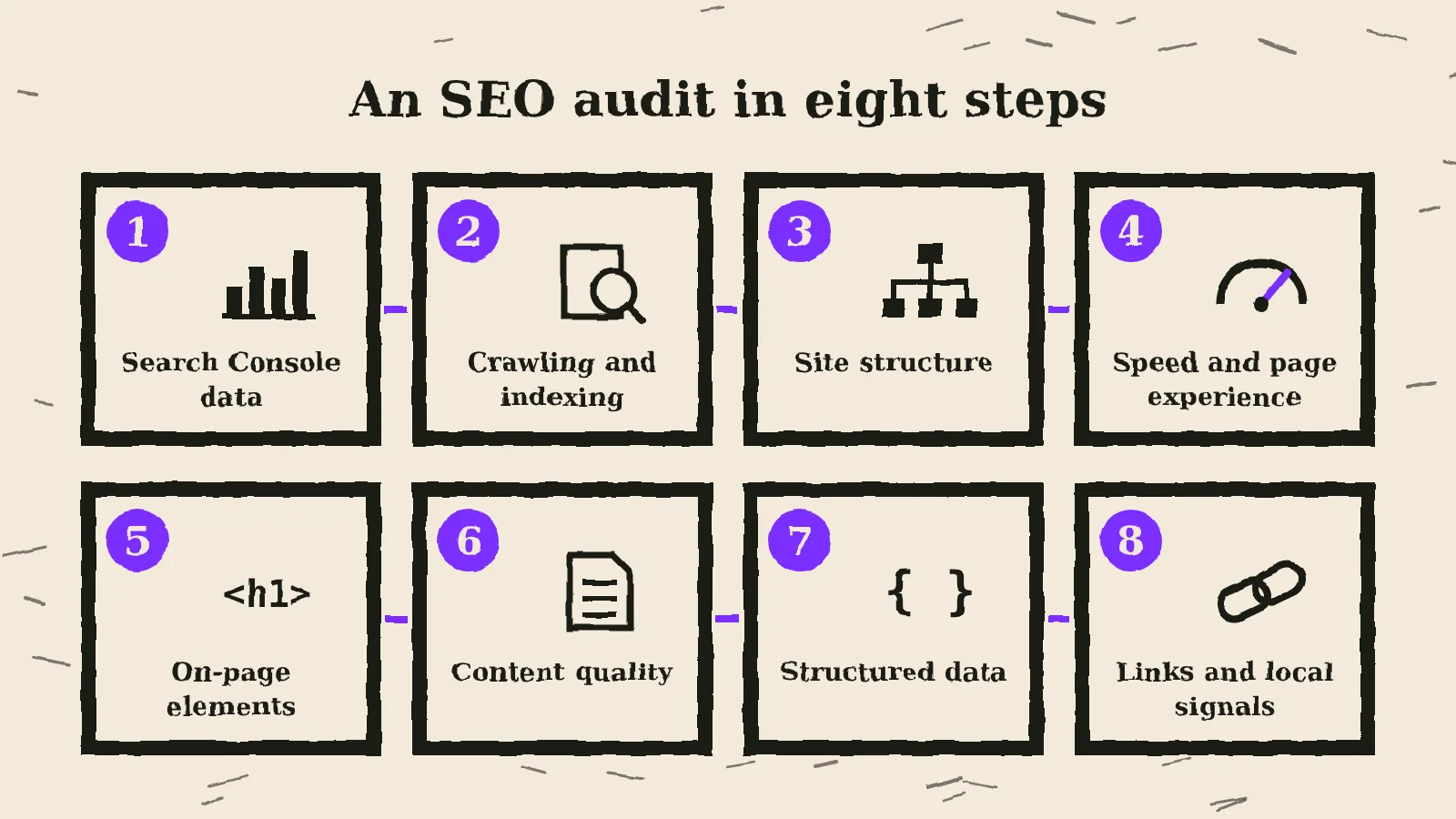
How to do an SEO audit in 8 steps
Work through the steps in order, because each one depends on the one before. Rewriting title tags is wasted effort if the pages are not indexed.
1. Start with Search Console data
Open the Performance report in Google Search Console and set the widest date range. Search Console keeps 16 months of performance data, enough to compare the last three months with the same months a year earlier. Note which pages and queries lost clicks, and filter out brand queries to see how the site performs with people who don’t know you yet. Your top 50 pages by clicks are the ones you can’t afford to break, so they set the order of work for every step that follows.
2. Check crawling and indexing
The Page indexing report lists the pages Google has indexed and the reason for every page it has left out, such as “Excluded by ‘noindex’ tag”, “Blocked by robots.txt” or “Duplicate without user-selected canonical”. Check that every important page is indexed and that your XML sitemap lists only the pages you want in search. Then read the robots.txt file itself. Google describes robots.txt as a way to manage crawler traffic and says it is not a mechanism for keeping a page out of Google. Use a noindex tag for that. A page that is both blocked in robots.txt and tagged noindex is a common finding: Google never sees the noindex, so the URL can stay in results. If the file needs rewriting, the free robots.txt generator builds a complete one with your sitemap and AI bot rules.
3. Crawl the site and review its structure
A crawler such as Screaming Frog follows every internal link from the homepage, the way a search engine does. In the crawl, look for:
- Broken internal links that lead to 404 pages.
- Redirect chains, where one URL redirects to another that redirects again.
- Important pages that sit more than three or four clicks from the homepage.
- Orphan pages that no other page links to.
- Canonical tags that point to the wrong URL or to a page that redirects.
4. Test speed and page experience
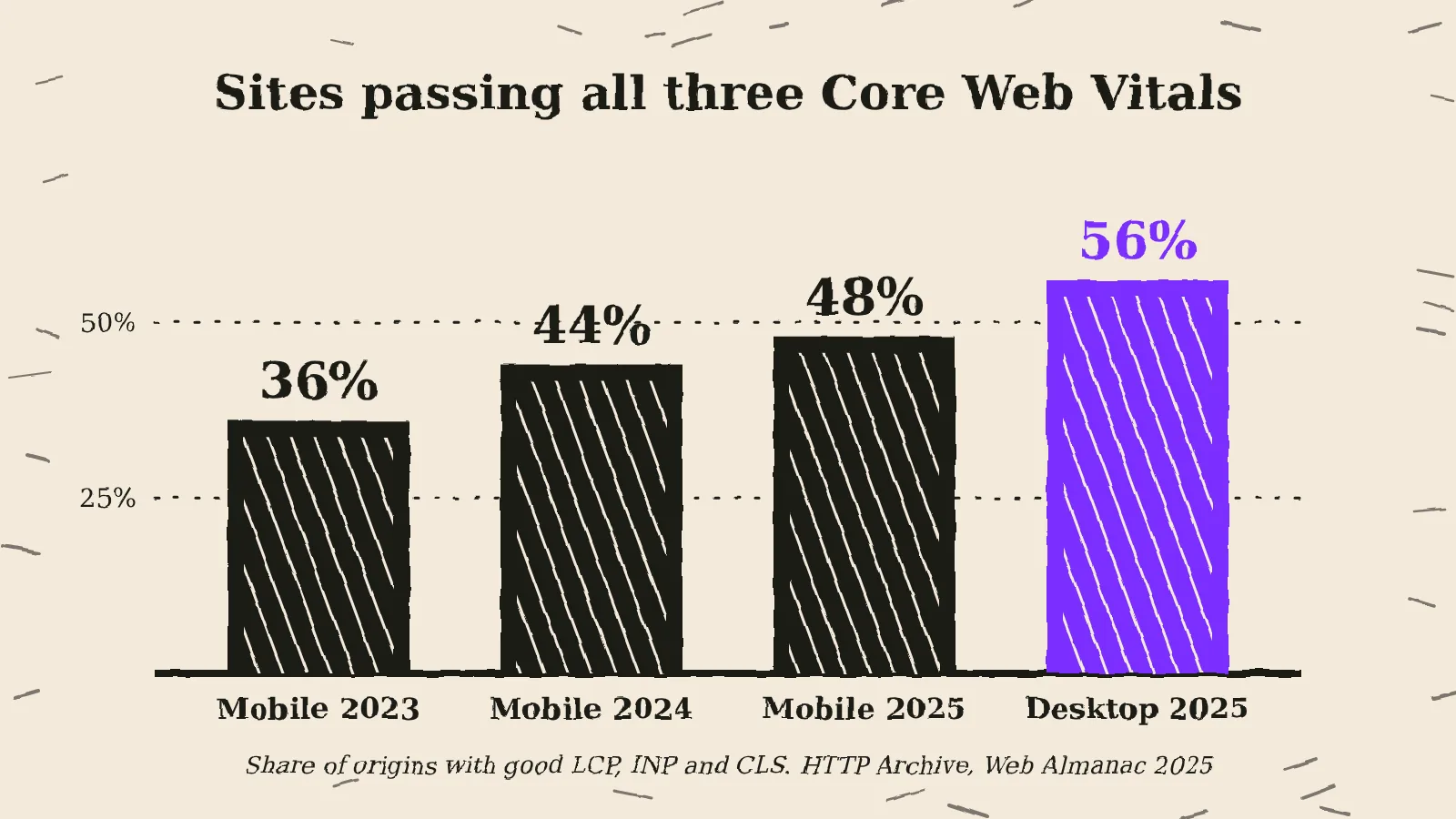
Google’s Core Web Vitals measure loading, responsiveness and visual stability. A page passes when, for at least 75% of visits, the main content loads within 2.5 seconds, the page responds to a tap or click within 200 milliseconds and the layout shift score stays at 0.1 or below, according to Google’s web.dev guidance. The Core Web Vitals report in Search Console groups similar URLs, so one template fix can solve hundreds of pages. Expect problems here: the HTTP Archive Web Almanac 2025 found that 48% of mobile sites passed all three metrics, up from 36% in 2023, with loading speed the most common reason for failing. Check HTTPS and mobile layouts while you test.
5. Review on-page elements
In the crawl data, look for missing, duplicate or truncated title tags, pages without a single clear H1 and important images without alt text. Then search each key page’s main keyword and compare your page with what ranks. If two or more of your pages target the same query, you have keyword cannibalisation, and the usual fix is to merge them or give each a distinct purpose.
6. Judge content quality
Automated tools can’t do this step. For your top pages and every page that lost traffic, ask the questions in Google’s guide to helpful, reliable, people-first content: does the page offer original information or analysis, is it clear who wrote it and why they can be trusted, and would a reader leave with what they came for?
Mark each page keep, update, merge or remove. Updating a page that already ranks on page two is often quicker than writing a new one. The E-E-A-T checklist covers authorship, sources and company details in a few minutes per page.
7. Validate structured data
Run one example of each page template through the Rich Results Test and fix any errors. Keep expectations realistic: since August 2023, Google has shown FAQ rich results only for well-known, authoritative government and health websites, so a business site without them has no bug to fix. Markup still helps search engines and AI tools understand who you are. If it is missing, the schema markup generator creates JSON-LD for organisations, local businesses, articles, FAQs, products and people.
8. Review links and local signals
The Links report in Search Console shows your most linked pages and the sites linking to you. Look for links that point to pages that now return a 404: a 301 redirect to the closest live page recovers their value. Sites that link to your competitors but not to you are the start of a link building plan. Local businesses should also check that their Google Business Profile matches the website and that reviews have replies.
How to prioritise SEO audit findings
A crawl can produce hundreds of warnings, and most won’t move rankings. Sort findings by how much they stop important pages being found, how many pages they affect and the effort to fix:
| Priority | What belongs here | Examples |
|---|---|---|
| Fix now | Problems that keep important pages out of search | Key pages blocked or tagged noindex, broken redirects after a migration, a sitemap full of error pages |
| Fix this quarter | Problems that weaken many pages or your best ones | Slow page templates, cannibalised service pages, key pages with no internal links |
| Fix when convenient | Small issues on pages that matter less | Duplicate titles on old blog posts, structured data warnings |
| Leave | Tool warnings with no effect on search | Minor HTML validation notes, low text-to-code ratio scores |
Add AI search checks to your SEO audit
Most audit checklists stop at Google. ChatGPT, Claude, Perplexity and Google’s AI features also decide which pages to cite, and an old robots.txt file can lock some of them out unnoticed. Three checks cover the gap.
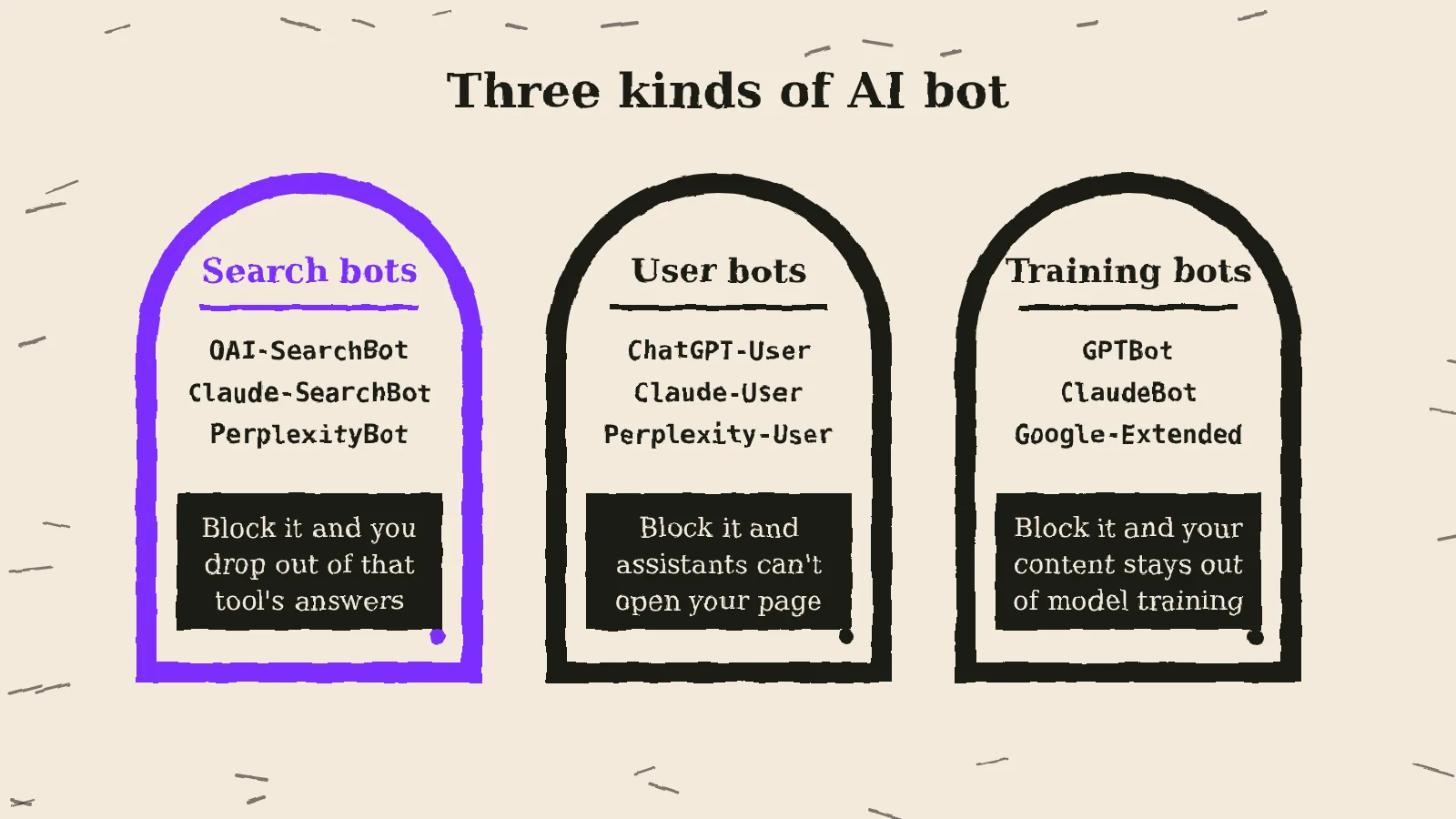
Which AI bots can reach the site. AI companies run separate bots for search, for user requests and for model training. OpenAI’s documentation says sites that block OAI-SearchBot will not be shown in ChatGPT search answers, while GPTBot collects training data, and you can allow one while blocking the other. Anthropic splits Claude-SearchBot, Claude-User and ClaudeBot in the same way. Google-Extended controls whether content is used for Gemini, and Google says it does not affect inclusion or ranking in Google Search. The AI Crawler Checker reads your robots.txt and shows which of 15 AI bots can visit a page.
Whether AI tools can read and quote the page. Pages that only show text after JavaScript runs, or bury the answer in long paragraphs, are harder to cite. The AI Readiness Checker runs 29 checks across access, readability, structure, structured data, trust signals and AI guides, and lists what to fix first.
Whether AI guides are in place. An llms.txt file is a proposed standard that lists a site’s key pages for AI tools. Google says there are no additional technical requirements for appearing in AI Overviews or AI Mode beyond being indexed and eligible for a snippet, so treat llms.txt as an optional extra for other assistants rather than a ranking factor. If you want one, the llms.txt generator builds it from your homepage and sitemap.
Tracking how often AI tools mention your brand over time is a separate job, covered in how to measure GEO performance.
SEO audit checklist
Use these questions as a quick version of the audit. A “no” or “not sure” marks something to investigate.
- Do you know which pages and queries bring most of your organic clicks, and how that changed over the last year?
- Are all important pages indexed, and does the sitemap list only pages you want in search?
- Does robots.txt allow Googlebot, Bingbot and the AI search bots to reach those pages?
- Is the site free of broken internal links, redirect chains and deeply buried key pages?
- Do your main page templates pass Core Web Vitals on mobile?
- Does every key page have a unique title tag, a meta description and one clear H1?
- Does each important query have one page targeting it, not two or three?
- Is every key page accurate, up to date and clear about who wrote it?
- Is structured data valid, and do links to deleted URLs redirect to a relevant live page?
DIY or an SEO audit service?
A site with a few hundred pages on WordPress or Shopify can be audited in-house with the free tools above. An SEO audit service earns its cost where mistakes are expensive or the cause is hard to find:
- Large sites with thousands of URLs, filters or faceted navigation.
- A planned migration, redesign or change of domain.
- A traffic drop that the obvious checks don’t explain.
- Sites built on JavaScript frameworks, or sites serving several countries and languages.
Whoever runs it, a useful report opens with the findings that matter, each with evidence, an owner and a priority. A 200-page crawler export tells you what a tool found, not what to do about it.
Common SEO audit mistakes
- Treating the tool’s score as the result. Site health scores weigh every warning, including ones that make no difference to search.
- Auditing without Search Console. Third-party tools estimate. Search Console shows what Google actually indexed and how people found you.
- Skipping the content review. Many traffic drops come from pages that no longer answer the query as well as their competitors, which no crawler can measure.
- Never checking the fixes. Re-crawl after changes and check the Page indexing report a few weeks later, then compare the results with your baseline at the next audit.
Frequently asked questions
What does an SEO audit include?
An SEO audit checks technical health (crawling, indexing, speed and structured data), on-page elements, content quality and links, plus local signals for businesses that serve an area. A modern audit also checks whether AI search bots can reach and cite the site. It ends with a prioritised list of fixes.
How long does an SEO audit take?
A small site with a few hundred pages can usually be audited in a few days. Large sites with thousands of URLs, several languages or a recent migration often take several weeks, most of it spent checking data and judging content.
How often should you do an SEO audit?
Run a full SEO audit once a year and check Search Console monthly in between. Run an extra audit before and after a redesign or migration, and whenever organic traffic falls without a clear reason.
Can I do an SEO audit for free?
Yes. Google Search Console, PageSpeed Insights, the Rich Results Test and the free version of Screaming Frog cover most of an audit for small sites. Free tools such as the AI Crawler Checker add the AI search checks.
How much does an SEO audit cost?
The cost depends on the size of the site, its platform and how deep the audit goes, from a technical check of one template to a full review of content, links and AI visibility. Ask for a sample report before you buy, so you know you will get prioritised fixes rather than a tool export.
What is an AI SEO audit?
The term is used in two ways: an audit carried out with AI tools, or an audit of how ready a site is for AI search. The second checks whether bots such as OAI-SearchBot and Claude-SearchBot can reach your pages and whether AI tools can read and cite them.
On this page
Back to topFind out what is holding your site back
Kutola runs SEO and AI search audits that check the data first, cover technical health, content and AI visibility, and end with a short list of fixes in order of impact. Get in touch to find out what an audit could show for your website.