
Instagram SEO is the practice of optimising your Instagram profile and posts so people can find them when they search, both inside Instagram and, increasingly, on Google. Instead of relying only on followers and the algorithm’s recommendations, it helps you reach people who are actively looking for what you offer.
Instagram is one of the main platforms covered by social media SEO, and it has become more important since public posts from professional accounts started appearing in Google results in July 2025. This guide explains how Instagram search works, how to optimise your profile, captions, hashtags and alt text, and how to measure the results.
What is Instagram SEO?
Instagram SEO means using the right words in the right places so Instagram understands what your account and content are about, and shows them to people searching for related topics. It also covers the signals that tell Instagram your content is worth showing, such as engagement from people who find it.
Unlike feed reach, which fades within days, search visibility can keep bringing new people to a post for months. For businesses, that makes Instagram SEO one of the most durable ways to grow on the platform, much like TikTok SEO on TikTok.
How Instagram search works
In its own explanation of how search works, Instagram describes three main signals, in order of importance:
- Your search text. The words typed into the search bar are by far the most important signal. Instagram matches them against usernames, profile names, bios, captions, hashtags and places.
- Your activity. The accounts a person follows, the posts they have viewed and how they have interacted with accounts in the past all shape their results.
- Popularity. When there are many possible results, Instagram looks at clicks, likes, shares and follows for an account, hashtag or place.
In practice, this means two things. Use the words your audience searches for in the places Instagram reads, and create content that earns engagement once people find it.
Instagram posts in Google search
Since 10 July 2025, public photos and videos from Instagram professional accounts can be indexed by search engines such as Google and Bing. This applies to accounts belonging to people aged 18 or over, and includes posts and Reels published from 2020 onwards. Stories and highlights are not included.
Account holders can control this in Instagram’s privacy settings, where there is an option to allow or stop public posts appearing in search engine results. If you want your content to be found on Google, make sure your account is public, set as a professional account and that this option is switched on.
This change makes captions and alt text more valuable than before. Google cannot watch a Reel the way a person does, so the words around it help decide whether it appears for a search.
How to optimise your Instagram profile
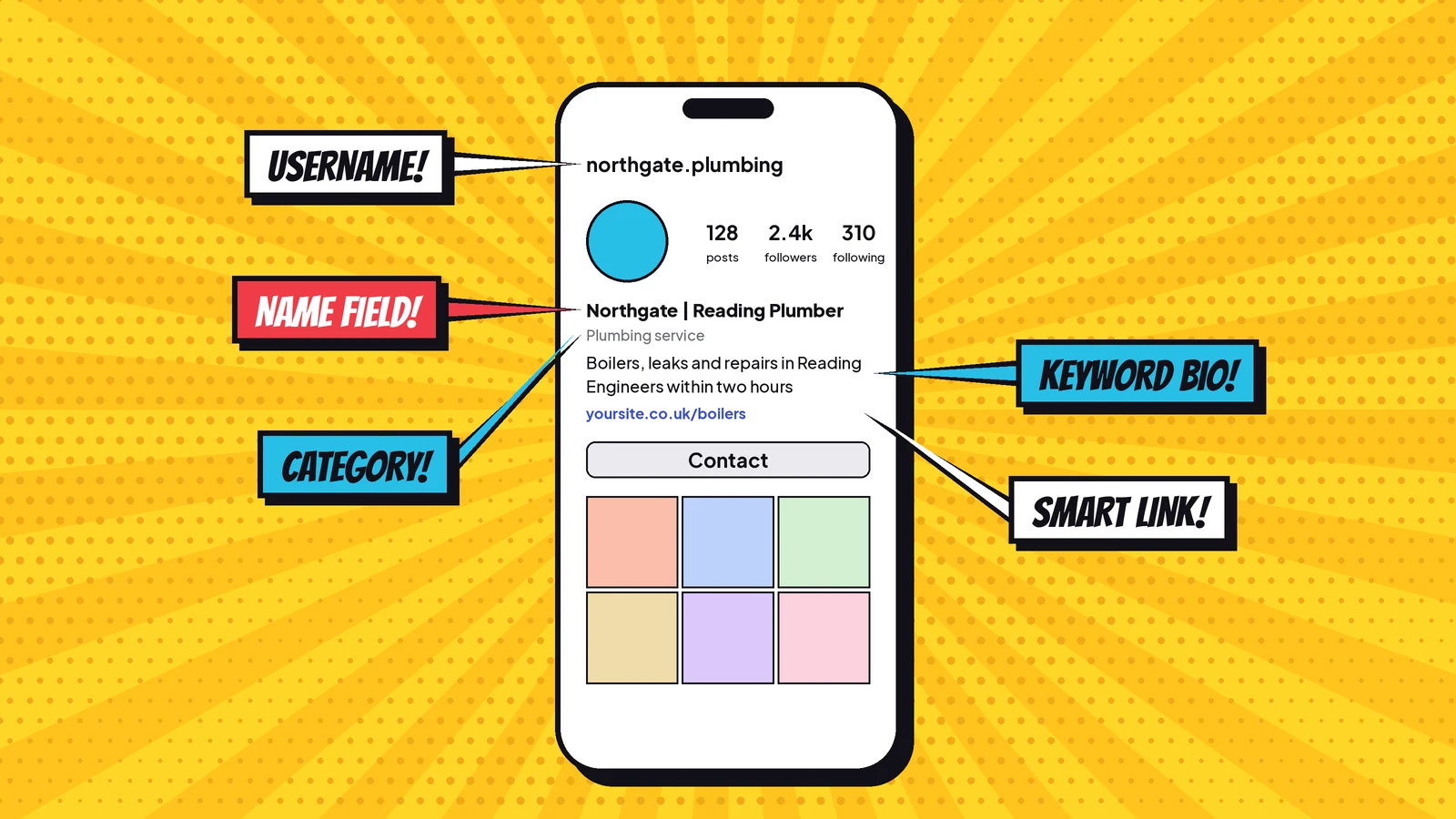
Your profile is the foundation of Instagram SEO. It tells both Instagram and Google what your account is about.
Name field
The name field, shown in bold under your profile photo, is searchable and separate from your username. Include your brand name and, where it fits naturally, your main keyword, such as “Northgate | Reading Plumber”. Keep it readable rather than packed with terms.
Username
Your username, or handle, should be easy to recognise, spell and search for. Ideally it matches your brand name on other platforms. Avoid strings of numbers, underscores and unusual spellings.
Bio
Use your bio to explain who you help and how, in plain words people might search for. Include your location if you serve a local area. Keep the description consistent with your website and other profiles, so it reinforces your brand positioning rather than contradicting it.
Category, contact details and link
Choose the most accurate category for your professional account, add contact details and use your link to send people to a relevant page on your website rather than only your homepage.
Write captions for search
Captions are one of the strongest signals for both Instagram search and Google. Treat the first line like a headline:
- Put the main topic or keyword in the first sentence, where it is visible before the “more” link.
- Describe what the post shows and who it is for, using natural language and long-tail phrases people actually search for.
- Write for people first. Captions stuffed with keywords read badly and lose engagement, which is also a ranking signal.
- Put keywords and hashtags in the caption itself, not in the comments.
How to use hashtags in 2026
Hashtags still help Instagram categorise content, but their role has changed. Since December 2025, Instagram has limited posts to five hashtags, with Instagram’s head Adam Mosseri describing hashtags as a tool for discovery rather than a way to boost reach.
- Choose up to five specific hashtags that describe the post, rather than broad tags with millions of posts.
- Mix one or two tags about the topic with one about your niche or location.
- Use the same branded hashtag consistently if you run a campaign or community.
- Do not rely on hashtags alone. Keywords in your profile and caption matter at least as much.

Add alt text to your images
Alt text describes an image for people using screen readers, and it also gives search engines more context about what the image shows. Instagram generates automatic alt text, but you can write your own in the advanced settings before publishing a post, or by editing a post afterwards.
Describe the image accurately and simply, and include a relevant keyword only if it fits naturally. For example: “Plumber fitting a new boiler in a kitchen in Reading” is far more useful than “boiler”.
Reels, carousels and location tags
- Reels: write a descriptive caption, use clear on-screen text in the first seconds and add captions so the video works without sound. Choose a cover image that shows what the Reel is about.
- Carousels: make the first slide clear and specific, and use the caption to summarise what the slides cover.
- Location tags: for local businesses, tag the real location so posts can appear for searches about that place.
Instagram SEO checklist
| Element | What to do |
|---|---|
| Account | Public, professional and eligible for search engine indexing |
| Name field | Brand name plus your main keyword, if it reads naturally |
| Username | Simple, consistent with your other profiles |
| Bio | Who you help, how and where, in searchable words |
| Captions | Keyword in the first line, written for people |
| Hashtags | Up to five specific, relevant tags in the caption |
| Alt text | A clear description of every image |
| Reels | Descriptive caption, on-screen text and subtitles |
| Location | Real location tags for local content |
How to measure Instagram SEO
- Reach from non-followers: Instagram’s insights show how many people you reached who do not already follow you, a good sign that content is being discovered.
- Profile visits and follows: growth after posts that target specific topics suggests people are finding you through search.
- Search testing: search your target keywords in Instagram and note where your account and posts appear.
- Google visibility: search your brand name and key topics on Google to see whether your Instagram posts and profile appear.
- Engagement on discovered posts: saves, shares and comments, measured through your engagement rate, show whether new viewers find the content useful.
Common Instagram SEO mistakes
- Keyword stuffing the name field. A name packed with terms looks like spam and can put people off.
- Using irrelevant hashtags. Tags that do not match the content attract the wrong audience and weaken signals.
- Leaving captions empty or vague. A single emoji gives Instagram and Google nothing to work with.
- Staying on a personal account. Only public professional accounts can have posts indexed by search engines.
- Inconsistent names across platforms. Different handles and descriptions make your brand harder to find and recognise.
Frequently asked questions
What is Instagram SEO?
Instagram SEO is the practice of optimising an Instagram profile and posts so they appear when people search, both in Instagram search and on search engines such as Google.
Do Instagram posts show up on Google?
Yes. Since 10 July 2025, public photos and videos from Instagram professional accounts, held by people aged 18 or over, can be indexed by search engines such as Google and Bing. Stories and highlights are not included.
How many hashtags should I use on Instagram?
Since December 2025, Instagram allows a maximum of five hashtags per post. Choose specific, relevant hashtags rather than broad ones, and include keywords in your caption as well.
Is the Instagram name field searchable?
Yes. The name field shown under your profile photo is searchable and separate from your username, so including your main keyword there can help people find your account.
Does alt text help Instagram SEO?
Yes. Alt text makes images accessible to people using screen readers and gives Instagram and search engines more context about what an image shows.
Make your Instagram easier to find
Kutola helps brands build visibility across Instagram, search engines and AI tools with one joined-up strategy. Get in touch to see how easily people can find your brand today.