Content audit: how to decide what to keep, update, merge or remove

A content audit is a page-by-page review of everything your website publishes, measured against what each page is meant to do. For every URL you record what it is, how it performs and whether it is still accurate, then decide one of four things: keep it, update it, merge it with another page or remove it.
It is the maintenance side of a content strategy, the part that keeps an archive useful as it grows. This guide covers when to run an audit, the six steps from inventory to action, how to make the four decisions without guesswork, what AI search changes and the columns to put in your audit spreadsheet.
What is a content audit?
An audit starts with an inventory. The Nielsen Norman Group draws the line clearly: a content inventory lists what you have, with each page’s URL, format, author and dates, while the audit judges its quality and decides whether it needs updating or removing. The inventory tells you there are 240 blog posts. The audit tells you that 60 of them still bring in enquiries, 90 need work and the rest are doing nothing.
Two other audits overlap with it. An SEO audit checks whether search engines can crawl, index and understand the site, so it looks at templates, redirects and speed. A digital marketing audit reviews every channel at once. A content audit sits between them: it looks at what each page says and whether that is still worth saying.
When to run a content audit
Most sites need a full audit once a year and a lighter check on their most important pages every quarter. Some moments call for one straight away:
- Before a redesign or migration. Moving pages you no longer need costs time and creates redirects you will have to maintain.
- After a drop in organic traffic. Google’s own guidance on helpful, people-first content suggests auditing the drops: which pages lost traffic and for which kinds of searches.
- Before a new content plan. You can’t plan new topics well without knowing which ones you already cover and how well.
- When a business changes. New prices, a dropped service or a rebrand leave old pages saying the wrong thing.
Large sites should audit in chunks. When the Government Digital Service audited 7,396 transport content items on GOV.UK with the Department for Transport, its main lesson was to split the work into smaller pieces, with a separate spreadsheet for each agency. A small business with 50 pages can do it in an afternoon. A site with thousands should go one section at a time.
How to do a content audit in 6 steps
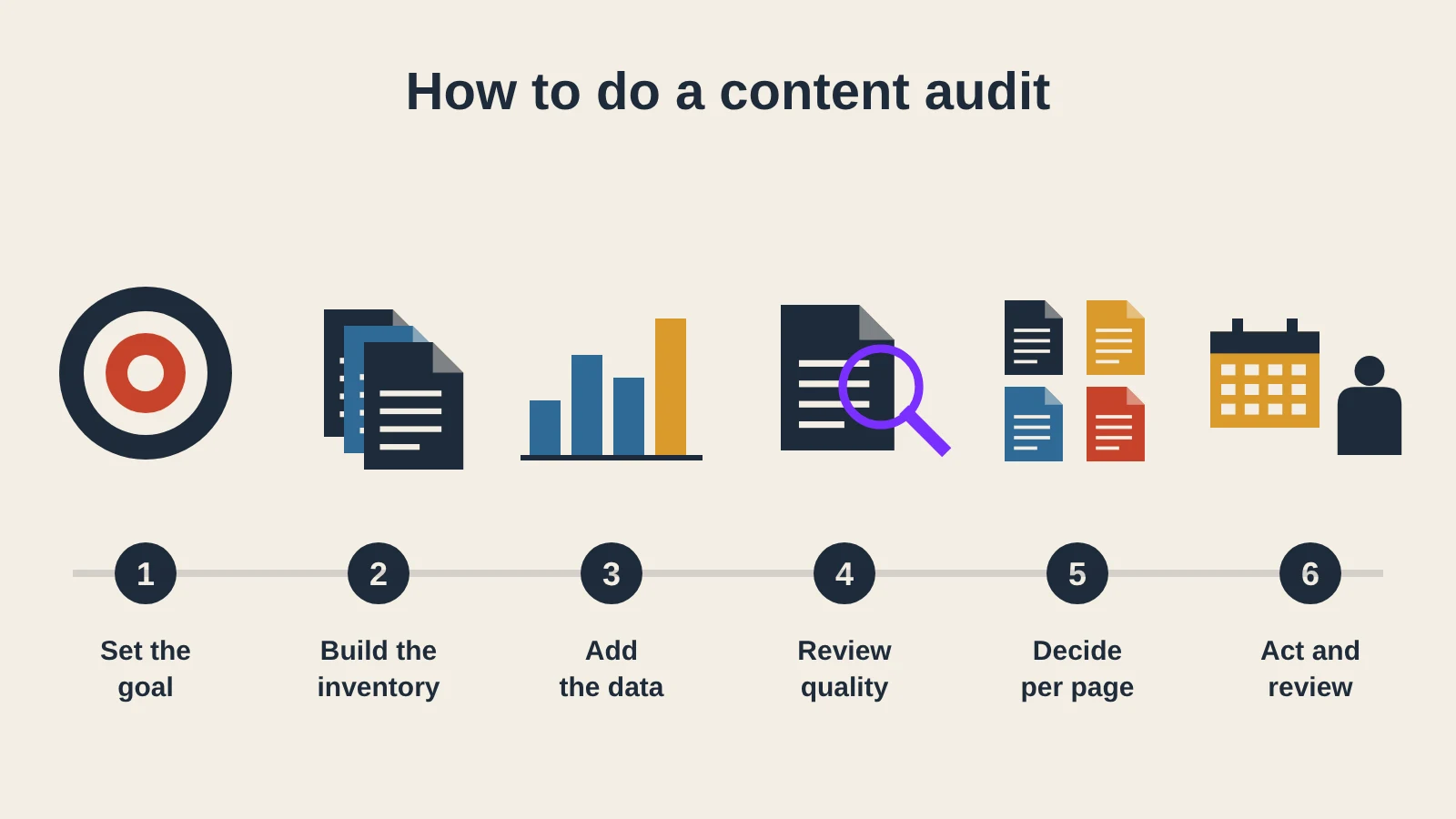
1. Set the goal and the scope
Write down what the audit is for, because the goal decides which numbers matter. An audit to win more enquiries weighs key events and service pages. An audit before a migration weighs which URLs carry traffic and links. Then choose the scope: the whole site, the blog only or one topic. Agree who owns each section, since someone has to act on the decisions.
2. Build the inventory
List every URL in scope. Your CMS export and XML sitemap are a start, but a crawler finds pages they miss, such as old landing pages that are no longer linked from anywhere. The Screaming Frog SEO Spider crawls up to 500 URLs at no cost, which covers most small business sites. Record the URL, title, content type, author, publication date and last update for each page.
3. Add performance data
Pull twelve months of data so seasonal pages are judged fairly. Google Search Console keeps 16 months of clicks, impressions and average position for each page, and shows which queries each one appears for. In GA4, add engaged sessions and key events per page. Google counts a session as engaged when it lasts longer than 10 seconds, includes a key event or has at least two page views, which is a more honest measure than raw visits. If you have a backlink tool, add the number of linking domains, because a page with strong links is rarely one to delete.
4. Review the quality
Numbers show which pages perform, not why. Read each important page and score it against a short set of questions. Google’s self-assessment list is a good base: does the page give original information or analysis, is it clearly sourced, does it show who wrote it and does it contain easily verified factual errors? The E-E-A-T signals of authorship, sources and company details belong in the same check. Note anything out of date: prices, screenshots, laws, statistics and the year in the title.
5. Decide what happens to each page
Give every URL one of the four decisions, using the criteria in the next section. Group pages by topic before you decide, so you can see where two or three posts answer the same question.
6. Act, then set review dates
Turn the decisions into tasks in your content calendar, starting with pages that already have traffic, since improving them pays back fastest. Give each page an owner and a next review date. Fast-changing pages, such as pricing or legal guides, need a review every few months. Evergreen guides can wait a year.
Keep, update, merge or remove
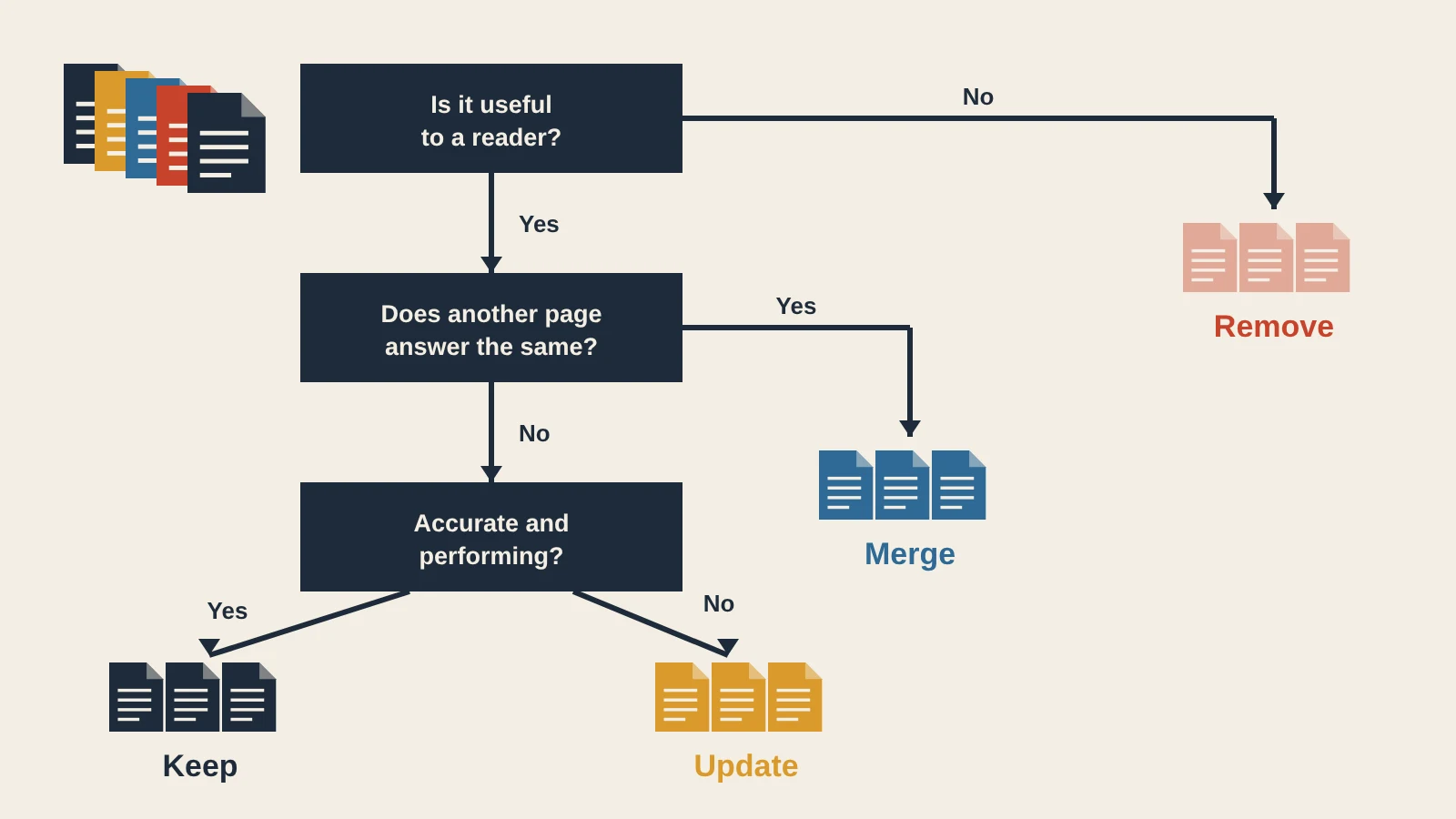
Each decision follows from two questions: does the page do a job for the reader, and does it do that job better than any other page on the site?
| Decision | When it fits | What to do |
|---|---|---|
| Keep | Accurate, performing and the best answer on the site for its topic | Leave it alone and set the next review date |
| Update | Useful topic, but outdated facts, a weak structure or traffic that has slipped | Refresh facts, examples and structure; improve the title and internal links |
| Merge | Two or more pages answering the same question and competing with each other | Combine the best parts into the stronger URL and redirect the others to it |
| Remove | No traffic, no links, no business purpose and no better version to send people to | Delete it and let the URL return a 404, or redirect if a close equivalent exists |
Update first. Pages with impressions but few clicks, or rankings just off the first page, usually need a better answer rather than a new page. When HubSpot reworked older blog posts, it more than doubled the monthly leads those posts generated and raised their monthly organic search views by an average of 106%. A real update can carry a new date. Google’s advice on dates is not to artificially freshen a story without adding significant information, so changing the date alone does nothing useful.
Merge when pages compete. Three short posts on the same question split the clicks and the links between them, a problem known as keyword cannibalisation. Combine them into the strongest URL, then point the others to it with a permanent redirect, which Google treats as a strong signal that the new page replaces the old one.
Remove with care. Old does not mean bad. In 2023, when CNET deleted thousands of older articles to appear fresher to Google, Google’s Danny Sullivan warned that removing content just because it is old is “not a thing” that helps a site rank. Remove a page because it no longer serves anyone. If no close equivalent exists, a 404 is the honest answer: Google treats 404 and 410 the same way and drops the URL from its index. Redirecting every removed page to the homepage only confuses visitors.
Content audits and AI search
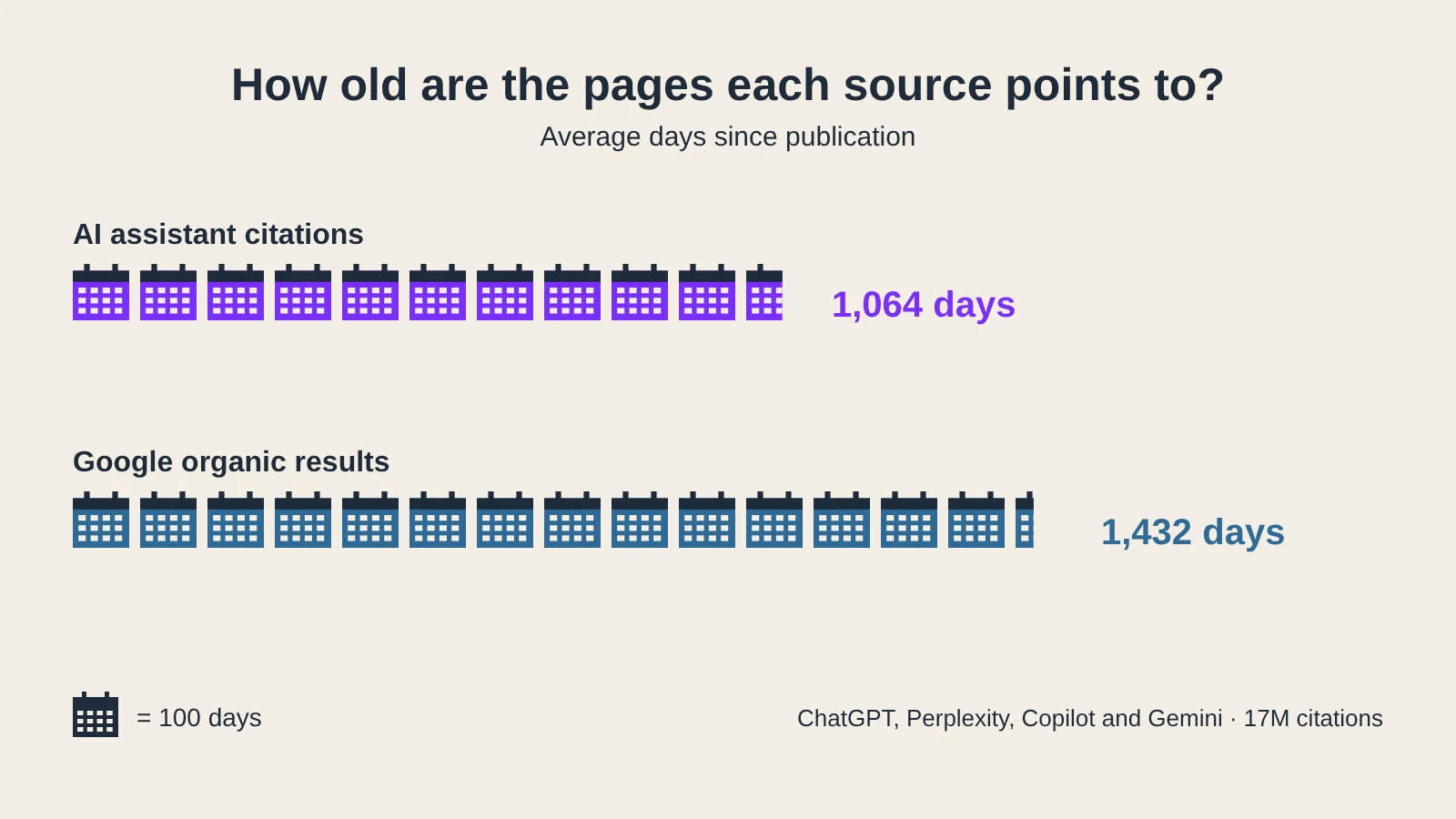
AI assistants add another reason to keep pages current. An Ahrefs study of 17 million citations found that ChatGPT, Perplexity, Copilot and Gemini cite content that is 25.7% fresher on average than the pages in Google’s organic results: 1,064 days old against 1,432. Google’s own AI Overviews behaved more like ordinary search in the same data, so the effect varies by platform.
Add three questions to the quality review for your most important pages. Does the page answer its question in the first paragraph? Is it structured with clear headings, lists and tables that an AI tool can quote? Does it show a named author and a visible update date? The AI Readiness Checker tests these points for a single URL, along with whether AI crawlers can reach the page at all. Pages that fail are strong candidates for the update list. For pages that lack structured data, the Schema Markup Generator creates Article and FAQ markup in JSON-LD. The wider approach is covered in the guide to generative engine optimisation.
Content audit template
A spreadsheet is enough. Use one row per URL and these columns, filled in roughly from left to right as you work through the steps:
| Column | Source | Example entry |
|---|---|---|
| URL and title | Crawler or CMS export | /blog/vat-registration/ · How to register for VAT |
| Type and topic | Your judgement | Guide · Tax |
| Target query | Search Console | how to register for vat |
| Clicks and impressions (12 months) | Search Console | 1,840 clicks · 52,000 impressions |
| Engaged sessions and key events | GA4 | 1,310 engaged sessions · 14 enquiries |
| Linking domains | Backlink tool | 9 |
| Last updated | CMS | March 2024 |
| Quality notes | Your review | VAT threshold out of date; no author shown |
| Decision and action | Your review | Update: new threshold, add author and FAQ |
| Owner and next review | Agreed with the team | Tax lead · after the next Budget |
Add a “merge into” column if you find many overlapping pages, and keep the finished sheet. Next year’s audit is much faster when you can compare against this one.
Common content audit mistakes
- Judging pages on traffic alone. A pricing page or a guide for existing customers may get few visits and still matter. Check what a page is for before calling it weak.
- Deleting pages that carry links. A post with no visits but a dozen linking domains is worth merging or redirecting, not dropping.
- Using too short a date range. Three months of data makes a Christmas gift guide look like a failure in June.
- Forgetting internal links. After a merge or removal, update the links that pointed to the old URL, and check for orphan pages that nothing links to.
- Auditing without acting. A finished spreadsheet changes nothing. Put the first ten actions in the calendar before you close it.
Frequently asked questions
What is a content audit?
A content audit is a page-by-page review of a website’s content. It records what each page is, how it performs and whether it is still accurate, then decides whether to keep, update, merge or remove it.
What is the difference between a content inventory and a content audit?
A content inventory is a list of every page with facts such as its URL, type, author and dates. A content audit uses that list to judge each page’s quality and performance and decide what happens to it.
How often should you do a content audit?
Most sites benefit from a full audit once a year and a quarterly check of their most important pages. Run one straight away before a redesign or migration, after a drop in organic traffic or when the business changes.
What tools do you need for a content audit?
A crawler such as Screaming Frog, Google Search Console, GA4 and a spreadsheet cover most audits. A backlink tool helps you avoid deleting pages that other sites link to.
Should you delete old content for SEO?
Not because it is old. Google has said that removing content only because of its age does not help rankings. Update pages that are still useful, merge pages that compete and remove only pages that serve no reader and have no better version to redirect to.
On this page
Back to topMake every page earn its place
Kutola runs content audits and content strategies that show which pages to keep, fix, merge or retire, with a plan your team can act on. Get in touch to find out what your content is really doing.