Technical SEO: the checklist that keeps search engines and AI tools reading your site

Technical SEO is the work that makes sure search engines and AI tools can find, fetch, understand and store the pages on your website. It covers how your site is crawled, which pages get indexed, how the site is structured, how fast and stable pages are and the code that describes your content to machines. If this layer is broken, good content and strong links cannot do their job.
This guide sits inside our wider SEO strategy guide and goes deeper on the technical side. It explains how search engines and AI tools read a site, then works through crawling, indexing, site structure, page experience, JavaScript and structured data. It covers what changes for AI search, gives you a technical SEO checklist in priority order and shows how to keep watch so problems are caught before they cost you traffic.
Key takeaways
- Technical SEO decides whether your pages can be found and stored at all. Rankings and AI citations both depend on it.
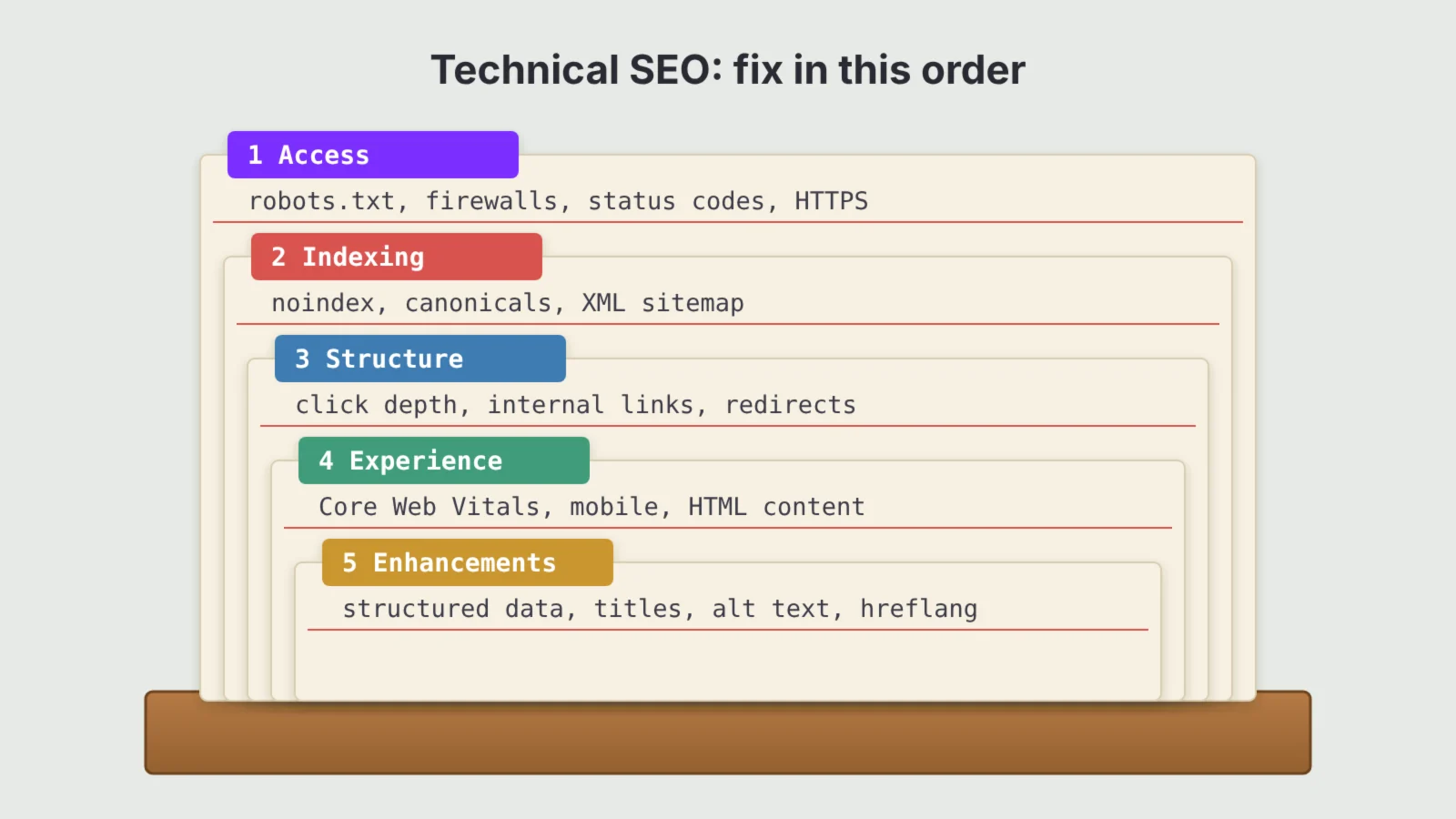
- Fix things in order: access first, then indexing, then structure, then speed, then enhancements such as structured data.
- Robots.txt controls crawling, not indexing. To keep a page out of search results, use noindex and let it be crawled.
- Many AI crawlers do not run JavaScript, so content that only appears after scripts load may be invisible to them.
- Google says its AI features need no special markup. A page has to be indexed and eligible for a snippet, which is a technical SEO job.
What is technical SEO?
SEO is often split into three parts. On-page SEO is about the content and wording of each page. Off-page SEO is about the links and mentions that point to your site from elsewhere. Technical SEO is about the site itself: the servers, code, settings and structure that decide how machines experience it.
The line between them is blurry. A clear heading structure helps both readers and crawlers, and internal links are part content decision and part architecture. A useful test is to ask who you are mainly serving. If the answer is the software that reads your site rather than the person reading the page, it is probably technical SEO.
For most small and medium sites, technical SEO is not about clever tricks. It is about removing obstacles. Search engines are very good at reading normal websites, so the work is mostly making sure nothing gets in their way and that the signals you send are consistent.
How search engines and AI tools read your site
Every page goes through the same basic stages before it can appear in a search result or an AI answer.
- Discovery. The crawler learns that a URL exists, usually from a link on another page or from your XML sitemap.
- Crawling. The crawler requests the URL from your server, after checking robots.txt to see whether it is allowed.
- Rendering. The crawler runs the page code, including JavaScript, to see the finished page. Google does this; many AI crawlers do not.
- Indexing. The search engine decides whether to store the page, which version to keep if there are duplicates and what the page is about.
- Serving. When someone searches or asks a question, the system picks indexed pages to rank, quote or cite.
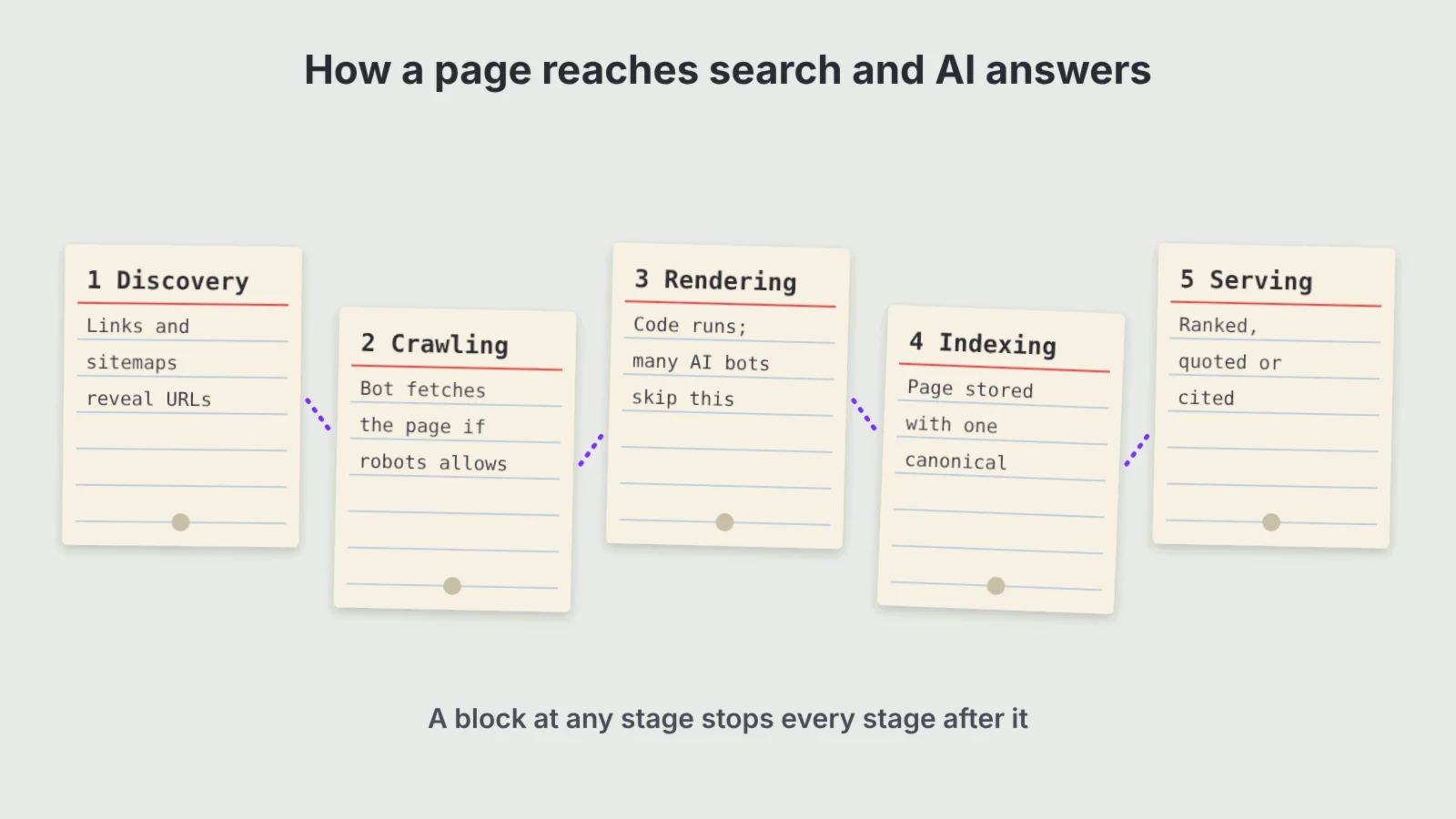
A problem at any stage stops everything after it. A page that is never discovered cannot be crawled, and a page that cannot be crawled cannot be indexed. That is why technical SEO starts at the top of the chain and works down.
AI search uses the same chain with a few changes. Google’s AI Overviews and AI Mode draw on Google’s normal index. ChatGPT, Claude and Perplexity send their own crawlers and also use search indexes from partners, so they have their own rules about what they can fetch. We cover those differences in the section on AI search below.
Crawling: let the right bots in
Crawling problems are the most damaging kind, because they hide pages completely. Start here.
Check your robots.txt file
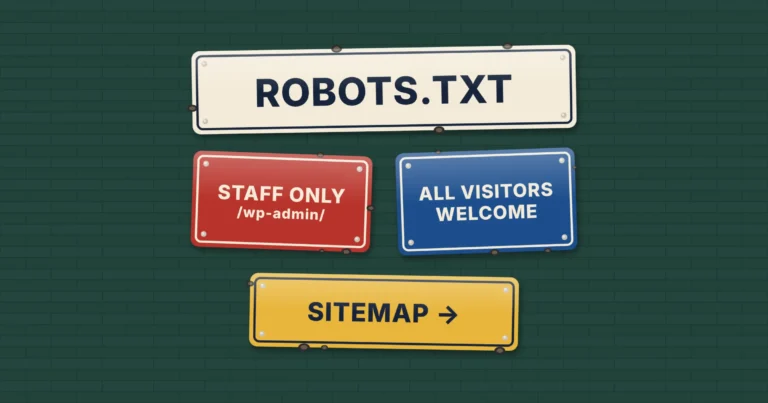
Your robots.txt file sits at the root of your domain and tells crawlers which paths they may request. A single wrong line, such as Disallow: / left over from a staging site, can block an entire website. Open yourdomain.co.uk/robots.txt and read it line by line. If you need to write or rebuild one, the Kutola Robots.txt Generator creates a clean file with the common rules and AI crawler settings in one place.
A few rules catch people out. Google only reads the first 500 KiB of a robots.txt file. Each subdomain needs its own file. And if your server returns an error for robots.txt rather than a normal response, Google may pause crawling the whole site until it can read the file. Our guide on how to write a robots.txt file covers the full syntax, AI crawler rules and how to test changes.
Keep server responses healthy
Crawlers judge a site partly by how it responds. Pages that return server errors (5xx codes), time out or redirect in long chains waste crawl effort and can drop out of the index. Check that important pages return a 200 status, that removed pages return 404 or 410 and that redirects go straight to the final URL in one hop with a 301.
Crawl budget: usually not your problem
Crawl budget is the number of URLs a search engine is willing and able to crawl on your site in a given period. It gets a lot of attention, but Google’s own guide on crawl budget says it is aimed at very large sites, such as those with over a million pages that change weekly or over 10,000 pages that change daily. A typical business site with a few hundred pages is crawled comfortably. Where crawl waste does matter, it usually comes from filters, search pages and URL parameters that create thousands of near-identical addresses.
Indexing: control what gets stored
Being crawled does not guarantee being indexed. Search engines choose which pages are worth keeping, and they need clear signals from you about which version of a page is the real one.
Use noindex, not robots.txt, to keep pages out of search
This is the most common technical mix-up. Blocking a page in robots.txt stops it being crawled, but Google can still index the URL if other pages link to it, often with no description. To keep a page out of results, add a noindex robots meta tag and leave the page crawlable so the search engine can see the instruction. Google stopped supporting noindex rules inside robots.txt in 2019.
Typical pages to noindex include thank-you pages, internal search results, thin tag archives and account pages. Check your SEO plugin settings too, because one ticked box can noindex a whole post type.
Set canonical tags for duplicates
Many sites serve the same content at several addresses: with and without a trailing slash, with tracking parameters or through product variations. A canonical tag tells search engines which address is the main one. Every indexable page should have a self-referencing canonical, and duplicates should point to the original. Keep the signals consistent: the canonical URL should be the one you link to internally and list in your sitemap.
Keep your XML sitemap clean
An XML sitemap lists the URLs you want search engines to know about. It helps discovery, especially for new or deep pages, but it is a hint rather than a command. A useful sitemap only contains pages that return 200, are indexable and are canonical. A sitemap full of redirects and noindexed pages teaches search engines to trust it less. Each sitemap file can hold up to 50,000 URLs or 50 MB uncompressed, and you should submit it in Google Search Console and Bing Webmaster Tools.
Read the page indexing report
Google Search Console’s page indexing report shows which pages are indexed and why others are not. Two statuses deserve attention. “Crawled, currently not indexed” usually points to content Google does not see as valuable enough, which is a quality question more than a technical one. “Discovered, currently not indexed” can mean Google found the URL but has not got round to crawling it, which may point to weak internal linking or a slow server.
Site architecture and internal links
Architecture is how your pages connect. A clear structure helps search engines find pages, understand which ones matter most and see how topics relate to each other.
- Keep important pages close to the homepage. A page that takes six clicks to reach looks less important than one that is two clicks away, and it is crawled less often.
- Link pages that belong together. Grouping related articles around a main guide, as described in our post on topic clusters, gives both people and crawlers a clear map of what you know.
- Avoid orphan pages. A page with no internal links pointing to it is hard to discover and sends a signal that you do not value it.
- Use descriptive anchor text. The words in a link tell search engines what the target page is about. “Read our guide to page speed” beats “click here”.
- Keep URLs short and readable. Use lowercase words separated by hyphens, and avoid changing URLs once they are live unless you redirect the old address.
- Add breadcrumbs. They show where a page sits in the structure and give crawlers another set of internal links.
Speed, Core Web Vitals and mobile
Page experience covers how quickly a page loads, how quickly it responds and how stable it is while loading. Google measures this with Core Web Vitals, using data from real Chrome users. According to Google’s web.dev guidance, a page passes when at least 75% of visits meet each of these thresholds:
| Metric | What it measures | Good |
|---|---|---|
| Largest Contentful Paint (LCP) | How long the main content takes to appear | 2.5 seconds or less |
| Interaction to Next Paint (INP) | How quickly the page responds to taps, clicks and key presses | 200 milliseconds or less |
| Cumulative Layout Shift (CLS) | How much the layout jumps while loading | 0.1 or less |
INP replaced First Input Delay as a Core Web Vital in March 2024, so older guides that mention FID are out of date. Core Web Vitals are a ranking signal, but a modest one. Relevance and quality matter far more. The bigger reason to care is people: slow pages lose visitors before they read a word, which is why speed is one of the barriers we cover in our guide to what stops visitors converting.
The usual fixes are well known: compress and resize images, serve them in modern formats such as WebP, reserve space for images and ads so the layout does not jump, cut unused scripts and plugins, use caching and a content delivery network and choose hosting that responds quickly.
Mobile-first indexing
Google now crawls and indexes sites using its smartphone crawler. It announced in October 2023 that the move to mobile-first indexing was complete. In practice, the mobile version of your site is the version Google judges. If content, links or structured data appear on desktop but are hidden or missing on mobile, Google may not see them at all.
HTTPS and security
Every page should load over HTTPS, with HTTP addresses redirecting to the secure version. Browsers warn visitors about insecure pages, and mixed content (secure pages that load images or scripts over HTTP) can break parts of a page. Check that your certificate renews automatically.
JavaScript and rendering
Modern websites often build pages with JavaScript in the browser. Google can render JavaScript, but it adds a step that can delay indexing, and errors in scripts can leave Google with an empty page.
AI crawlers are a bigger concern. Analysis by Vercel of crawler traffic across its network found that the main AI crawlers, including those from OpenAI and Anthropic, fetch JavaScript files but do not run them. Content that only appears after scripts load, such as product details, prices, reviews or tabbed text, may simply not exist for those tools.
The safest approach is to make sure your important content is in the HTML the server sends. Server-side rendering or static generation does this for JavaScript frameworks, and most WordPress sites already work this way. A quick test is to view the page source (not the inspected page) and search for a sentence from your main content. If it is not there, crawlers that do not render may not see it either.
Structured data
Structured data is code, usually in JSON-LD format, that describes the content of a page in a standard vocabulary from Schema.org. It tells machines that a page is an article with an author and a date, a product with a price and stock level or a local business with an address and opening hours.
Its main benefit in Google is eligibility for rich results, such as product prices, review stars, events or breadcrumbs in the search listing. It does not directly improve rankings, and Google has cut back several rich result types in recent years, so treat it as a way to describe your content accurately rather than a shortcut to extra space in results.
Keep it honest and consistent. The marked-up information must match what visitors can see on the page, and it should agree with the facts elsewhere, such as your Google Business Profile. Test new markup with Google’s Rich Results Test before you publish it, and watch the enhancement reports in Search Console for errors.
Technical SEO for AI search
Most of what helps AI search is ordinary technical SEO done well. Google’s guide to AI features is clear that there is no special markup or file needed for AI Overviews or AI Mode. A page must be indexed and eligible to show with a snippet, which is exactly what the sections above protect.
Other AI tools add one extra layer: their own crawlers. Each company publishes the names (user agents) its bots use, and you can allow or block them in robots.txt. The main ones to know are:
| Company | Crawler for AI search answers | Crawler for training models |
|---|---|---|
| OpenAI | OAI-SearchBot (and ChatGPT-User for pages a user asks it to open) | GPTBot |
| Anthropic | Claude-SearchBot (and Claude-User) | ClaudeBot |
| Perplexity | PerplexityBot (and Perplexity-User) | Not used for training, according to Perplexity |
| Googlebot, the same crawler as normal search | Google-Extended (a robots.txt token, not a separate crawler) |
The split matters. Blocking a training crawler stops your content being used to train future models but does not remove you from AI search answers. Blocking a search crawler can stop you being cited at all. Google-Extended is a special case: blocking it opts you out of Gemini model training, but it does not affect AI Overviews or AI Mode, which use Googlebot. Many businesses decide to allow the search crawlers and make a separate choice about training.
Firewalls and bot protection can block these crawlers without anyone noticing. Some content delivery networks block AI bots by default, so a rule you never set may be stopping them. The Kutola AI Readiness Checker tests whether the main AI crawlers can reach your pages and flags the technical gaps that most often hide a site from AI answers.
Two other points are worth knowing. First, clean HTML with clear headings, short paragraphs and descriptive tables is easier for any system to quote accurately. Second, an LLMs.txt file is optional. Google says it does not use one, and the evidence that other platforms rely on it is thin, so it belongs at the end of the list rather than the start. The bigger picture of earning citations, beyond the technical layer, is covered in our guide to generative engine optimisation.
Technical SEO checklist
Work through these in order. Each group depends on the one before it, so there is little point polishing structured data while important pages are blocked from crawling.
1. Access
- Robots.txt allows the pages and crawlers you want, and blocks nothing important.
- Firewall and bot protection settings are not blocking legitimate search or AI crawlers.
- Important pages return a 200 status and the server responds quickly.
- The whole site loads over HTTPS, with one preferred version of the domain.
2. Indexing
- Pages you want in search have no noindex tag, and pages you do not want are noindexed rather than blocked.
- Every indexable page has a correct self-referencing canonical tag.
- The XML sitemap lists only indexable, canonical pages and is submitted to Google and Bing.
- The page indexing report in Search Console has no unexplained drops.
3. Structure
- Key pages are within three clicks of the homepage.
- No important page is an orphan.
- Redirects go straight to the final URL, and broken internal links are fixed.
- URLs are short, readable and stable.
4. Experience
- Core Web Vitals pass on mobile for your main page templates.
- The mobile version shows the same content, links and structured data as desktop.
- Main content is present in the HTML without running JavaScript.
5. Enhancements
- Structured data matches the visible page and passes Google’s Rich Results Test.
- Title tags and meta descriptions are unique and describe each page.
- Images have descriptive file names and alt text.
- If you serve several countries or languages, hreflang tags are set correctly.
How to monitor technical SEO
Technical problems rarely announce themselves. A plugin update, a theme change or a new firewall rule can quietly block pages, and you may only notice when traffic falls weeks later. Build a simple routine instead.
- Weekly: glance at the Search Console overview and email alerts for sudden drops in indexed pages or spikes in errors.
- Monthly: review the page indexing, Core Web Vitals and enhancement reports, and check Bing Webmaster Tools, since Bing’s index also feeds several AI tools.
- Quarterly: run a full crawl with a tool such as Screaming Frog to catch broken links, redirect chains, missing canonicals and orphan pages.
- After every big change: recheck robots.txt, noindex settings, redirects and the sitemap after a redesign, migration, new plugin or hosting move.
If you can access your server logs, they show which crawlers actually visit and which pages they request. That is the only way to see AI crawler activity directly. For a full review that brings technical findings together with content and links, follow our step-by-step SEO audit guide.
Common technical SEO mistakes
- Launching with the staging settings still on. A “discourage search engines” box or a
Disallow: /rule copied from a test site is one of the most common causes of a site vanishing from search. - Blocking pages in robots.txt to deindex them. This hides the noindex tag from crawlers and can leave the URL in results.
- Redirecting old URLs to the homepage. After a redesign, map each old page to its closest new equivalent. Blanket homepage redirects are often treated as soft 404s.
- Chasing perfect scores. A green PageSpeed score is nice, but real user data in Core Web Vitals is what counts, and a few points rarely change rankings.
- Blocking AI crawlers by accident. Check your CDN and security plugin settings before assuming AI tools are ignoring you.
- Hiding key content behind scripts or tabs that need clicks. If it is not in the HTML, some crawlers will never see it.
- Treating technical SEO as a one-off project. Sites change constantly, so the checks need to repeat.
Frequently asked questions
What is technical SEO?
Technical SEO is the work that helps search engines and AI tools crawl, render, index and understand your website. It covers robots.txt, sitemaps, canonical tags, site structure, page speed, mobile performance, HTTPS, JavaScript and structured data.
What is the difference between technical SEO and on-page SEO?
On-page SEO deals with the content of each page, such as wording, headings and title tags. Technical SEO deals with the site as a whole, such as how it is crawled, indexed, structured and loaded. The two overlap, and both are needed.
Can I do technical SEO myself?
For most small sites, yes. Google Search Console, Bing Webmaster Tools and a free crawler cover the basics. Get specialist help for migrations, large ecommerce sites, JavaScript frameworks or a sudden unexplained drop in indexed pages.
How often should I check technical SEO?
Glance at Search Console weekly, review its reports monthly and run a full site crawl every quarter. Always recheck robots.txt, noindex settings, redirects and the sitemap after a redesign, migration or major plugin change.
Does technical SEO affect AI search?
Yes. Google’s AI Overviews and AI Mode only use pages that are indexed and eligible for snippets, and other AI tools need their own crawlers to be allowed in. Many AI crawlers also skip JavaScript, so content must be in the page HTML.
Should I block AI crawlers?
That is a business decision. Blocking training crawlers such as GPTBot or ClaudeBot keeps your content out of model training, while blocking search crawlers such as OAI-SearchBot can stop you being cited in AI answers. Many businesses allow search crawlers and decide on training separately.
On this page
Back to topMake sure search engines and AI tools can read your site
Kutola checks the technical foundations behind your rankings and AI visibility, from crawling and indexing to speed and structured data, and turns the findings into a clear fix list. See how it fits into our SEO and AI search work, or get in touch to talk through your site.