How to plan topic clusters around one pillar page

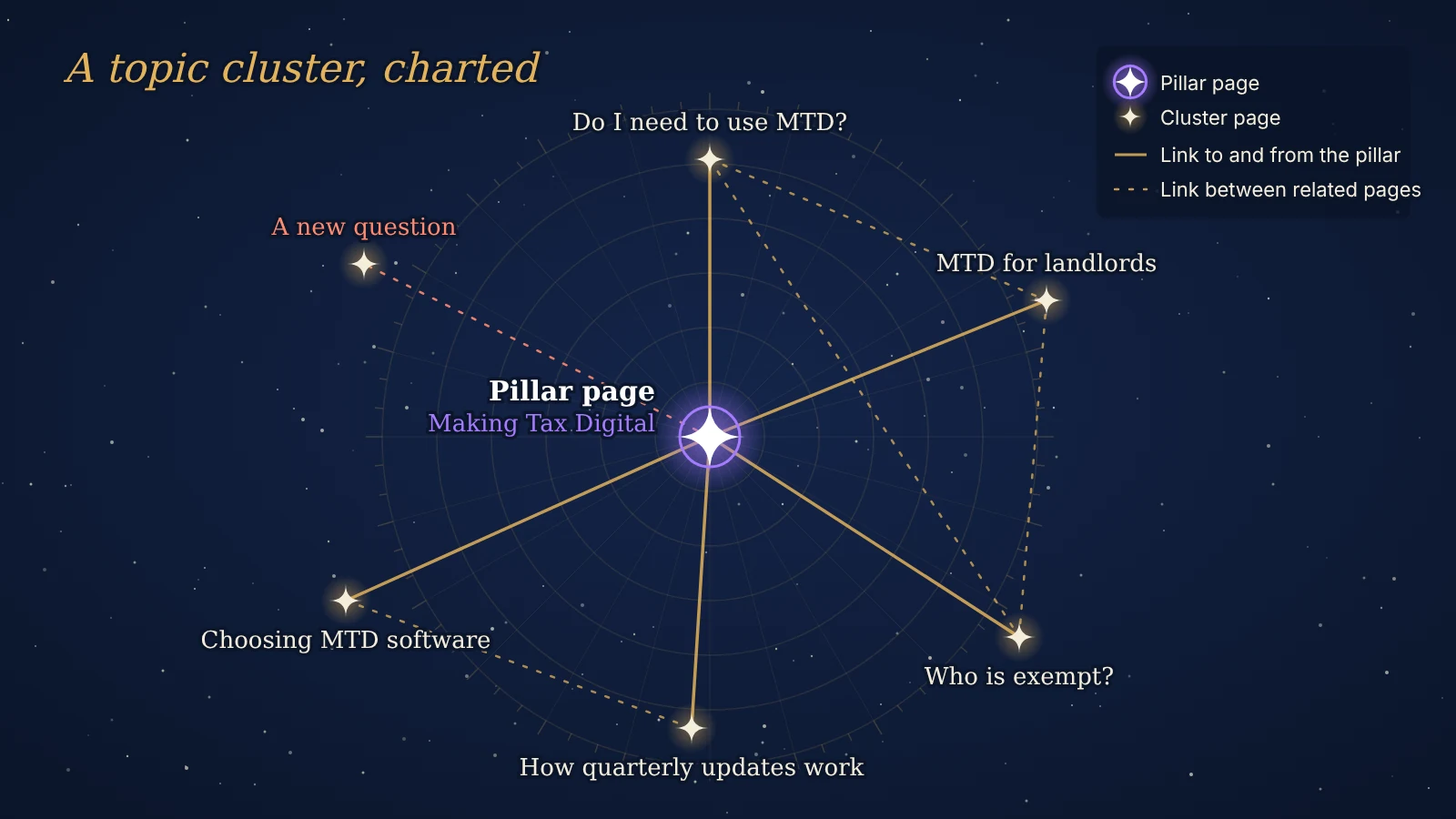
A topic cluster is a group of pages that covers one subject together. One broad pillar page gives the overview, a set of narrower cluster pages each answer one specific question in depth and internal links join them in both directions. The structure tells readers and search engines that your site covers the subject properly, not in scattered posts that happen to share a keyword.
Topic clusters are how the core topics in a content strategy become actual pages. This guide explains how a pillar page differs from a cluster page, how to plan a cluster from scratch, when a question deserves its own page, how to link the pages and how to tell whether a cluster is working, with a worked example and a look at what clusters mean for AI search.
What is a topic cluster?
A topic cluster has three parts:
- A pillar page that targets the broad term and covers every main part of the subject at overview level.
- Cluster pages that each target one narrower search, such as a how-to, a comparison or a cost question, and answer it fully.
- Internal links that connect them: every cluster page links to the pillar, the pillar links out to every cluster page and related cluster pages link to each other.
The model is often called hub and spoke. HubSpot popularised it after reorganising its own blog into topic areas, each anchored by one overview page, instead of writing separate posts aimed at individual long-tail keywords. The SEO strategy guide gives the short version of the idea. The rest of this guide is about planning and running one.
Pillar page vs cluster page
A pillar page is the main guide to a subject. It answers “what is it, why does it matter and how does it work” and points the reader to deeper pages for each part. A cluster page goes the other way: it takes one of those parts and covers it in more detail than the pillar ever could.
| Pillar page | Cluster page | |
|---|---|---|
| Scope | The whole subject, at overview level | One question or task, in depth |
| Target search | The broad head term, such as “Making Tax Digital” | A specific query, such as “Making Tax Digital for landlords” |
| Search intent | Mostly informational, early research | Informational or commercial, often closer to a decision |
| Links | Out to every cluster page, in the section where each fits | Back to the pillar early on, and across to related cluster pages |
| Updates | When the subject changes or a new cluster page is added | When its own facts, prices or rules change |
A pillar page is not defined by length. It is defined by scope. A pillar that tries to answer every sub-question in full ends up competing with its own cluster pages, and the cluster pages have nothing left to add.
Why topic clusters work
Clusters help for practical reasons rather than because Google rewards a particular site layout.
- Links carry meaning. Google says it uses links as a signal of relevance and to find new pages to crawl, and its link best practices ask for anchor text that describes the page it points to. A cluster creates many of these descriptive links on purpose.
- Each page has one job. When every query in a topic is mapped to one page, two of your own pages stop competing for the same search, the problem known as keyword cannibalisation.
- Depth becomes visible. A set of linked pages that answer the questions people actually ask about a subject is the clearest way to show topical authority.
- Readers keep going. Someone who lands on a narrow cluster page from search can step up to the overview or across to the next question without going back to Google.
There is data behind the linking part. Zyppy’s analysis of 23 million internal links across 1,800 websites compared each page’s internal links with its Google Search Console clicks. Pages with 40 to 44 internal links received about four times as many clicks as pages with zero to four, and the link between clicks and the number of different anchor texts pointing at a page was so strong that Zyppy ran the data three times. It is a correlation, not proof, but it matches what clusters are built to do.
One thing clusters do not require is a single-topic site. Google’s guidance on helpful content warns against producing lots of content on many topics in the hope that some of it ranks, and Google’s Search Liaison has clarified that content does not need to sit in one niche to rank well. The warning is about the motive. Clusters keep each subject you do cover deep and well connected.
How to plan topic clusters in 6 steps
1. Choose the core topic. Start where three things meet: a service you sell, a subject your audience asks about often and something you can explain with real authority. Most small and mid-sized businesses need three to five core topics, and each one becomes a cluster.
2. List every question people ask about it. Collect them from your sales calls and enquiry emails, Google’s People Also Ask box, autocomplete, a keyword tool and the queries already bringing people to your site in Google Search Console. Aim for a long, messy list before you sort anything.
3. Group the questions by intent. Questions that the same page would answer belong together. “MTD for landlords” and “do landlords need Making Tax Digital” are one page. “MTD software” is a different job, because the searcher is choosing a product. This is the keyword mapping step described in keyword research, and it decides how many pages the cluster needs.
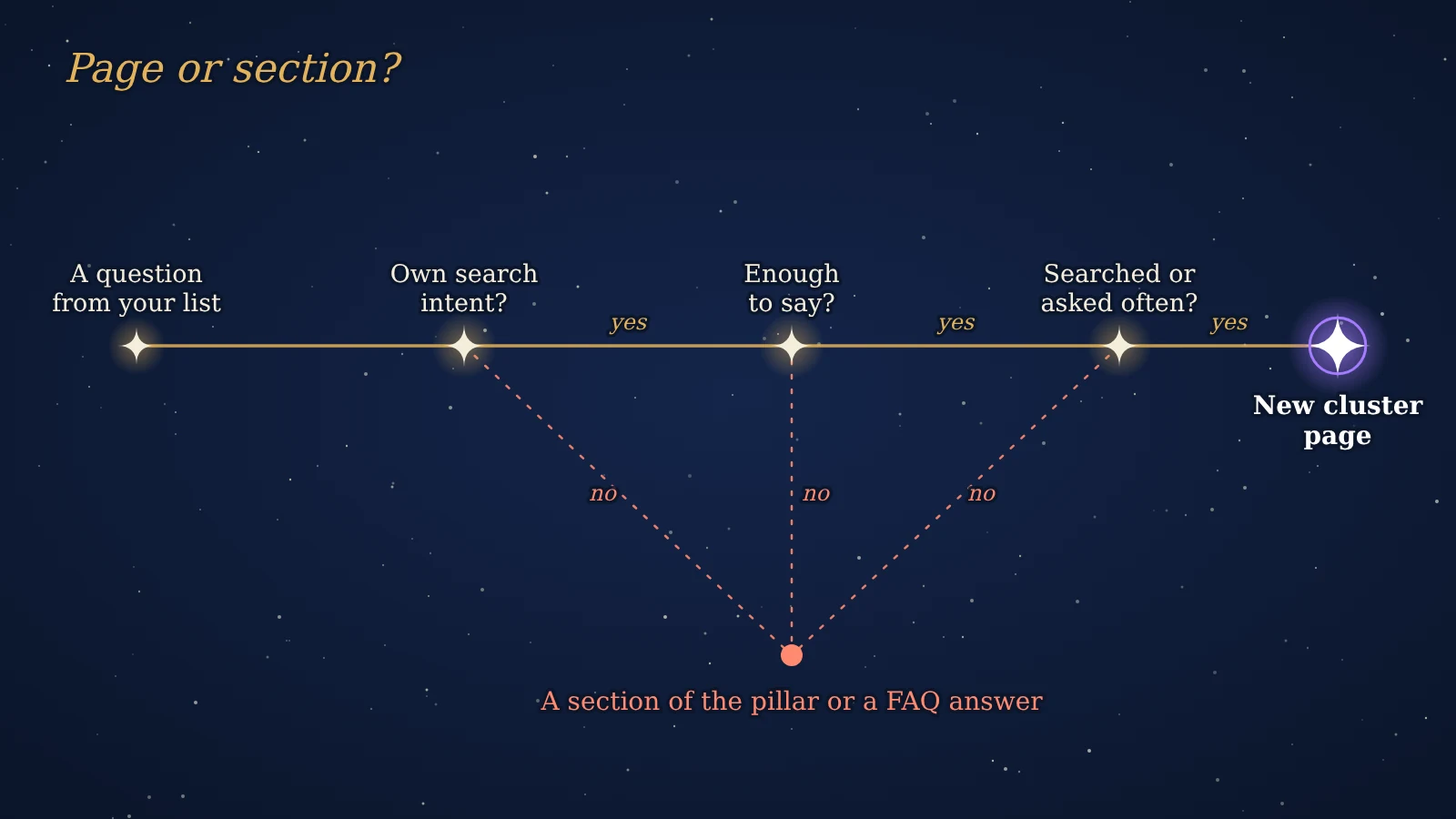
4. Decide what earns its own page. Not every group should become a cluster page. Give a group its own page only when it passes all three tests below. Everything else becomes a section of the pillar or a FAQ answer.
- It has its own search intent: the results page for it looks different from the results for the pillar term.
- There is enough to say: steps, examples, a table or a decision that would swamp a section of the pillar.
- Someone searches for it, or your customers ask it often enough that sales would send them the link.
5. Map the links before you write. For each page, note its target query, which section of the pillar links to it and which other cluster pages it should link to. Keeping the cluster’s URLs together, for example under one folder, also helps: Google’s SEO Starter Guide suggests grouping topically similar pages in directories so it can learn how often each part of a site changes.
6. Publish in a sensible order and keep the map up to date. Publish the pillar first so cluster pages have something to link to, then add cluster pages in order of business value. Put the schedule in your content calendar. When an existing page already covers a cluster question, update it and fold it into the cluster rather than writing a new one.
How to link a topic cluster
The links are what turn a set of related articles into a cluster. A few rules keep them useful:
- Link from each cluster page to the pillar early, usually in the first two paragraphs, where it explains what the reader is looking at.
- Link from the pillar to each cluster page in the section it belongs to, not in a list of “related posts” at the bottom. The surrounding text tells readers and search engines what the linked page covers.
- Link between cluster pages only where a reader would naturally want the next page. Linking everything to everything blurs what each link is for.
- Write descriptive, varied anchor text. Use the phrase the reader would expect, such as “MTD rules for landlords”, never “click here”, and do not repeat the same exact anchor on every page.
- Leave no page out. A cluster page that nothing links to is an orphan page, and search engines and readers will struggle to find it.
When you publish a new cluster page, go back to the pillar and to two or three related cluster pages and add a link where the text already mentions the subject. Skip this step and the cluster only links in one direction.
A topic cluster example
Take a small accountancy firm whose clients are sole traders and landlords. Making Tax Digital for Income Tax is an obvious core topic: it became compulsory from 6 April 2026 for those with qualifying income over £50,000, and the threshold falls to £30,000 in April 2027 and £20,000 in April 2028. Every one of those clients has questions, and each change in the threshold brings a new wave of searches.
| Page | Target query | Type | Links to |
|---|---|---|---|
| Making Tax Digital for Income Tax: a guide for sole traders and landlords | making tax digital | Pillar | All cluster pages, the MTD service page |
| Do I need to use Making Tax Digital? | making tax digital threshold | Cluster | Pillar, MTD for landlords |
| Making Tax Digital for landlords | making tax digital for landlords | Cluster | Pillar, MTD exemptions |
| Choosing MTD software | making tax digital software | Cluster | Pillar, quarterly updates |
| How quarterly updates work | mtd quarterly updates | Cluster | Pillar, choosing MTD software |
| Who is exempt from Making Tax Digital? | making tax digital exemptions | Cluster | Pillar, do I need to use MTD |
Questions such as “what is Making Tax Digital” and “when does MTD start” stay in the pillar, because the answer is a paragraph and the results page for them is the same as for the broad term. The pillar and every cluster page also link to the firm’s MTD service page, which is where the enquiries come from.
Topic clusters and AI search
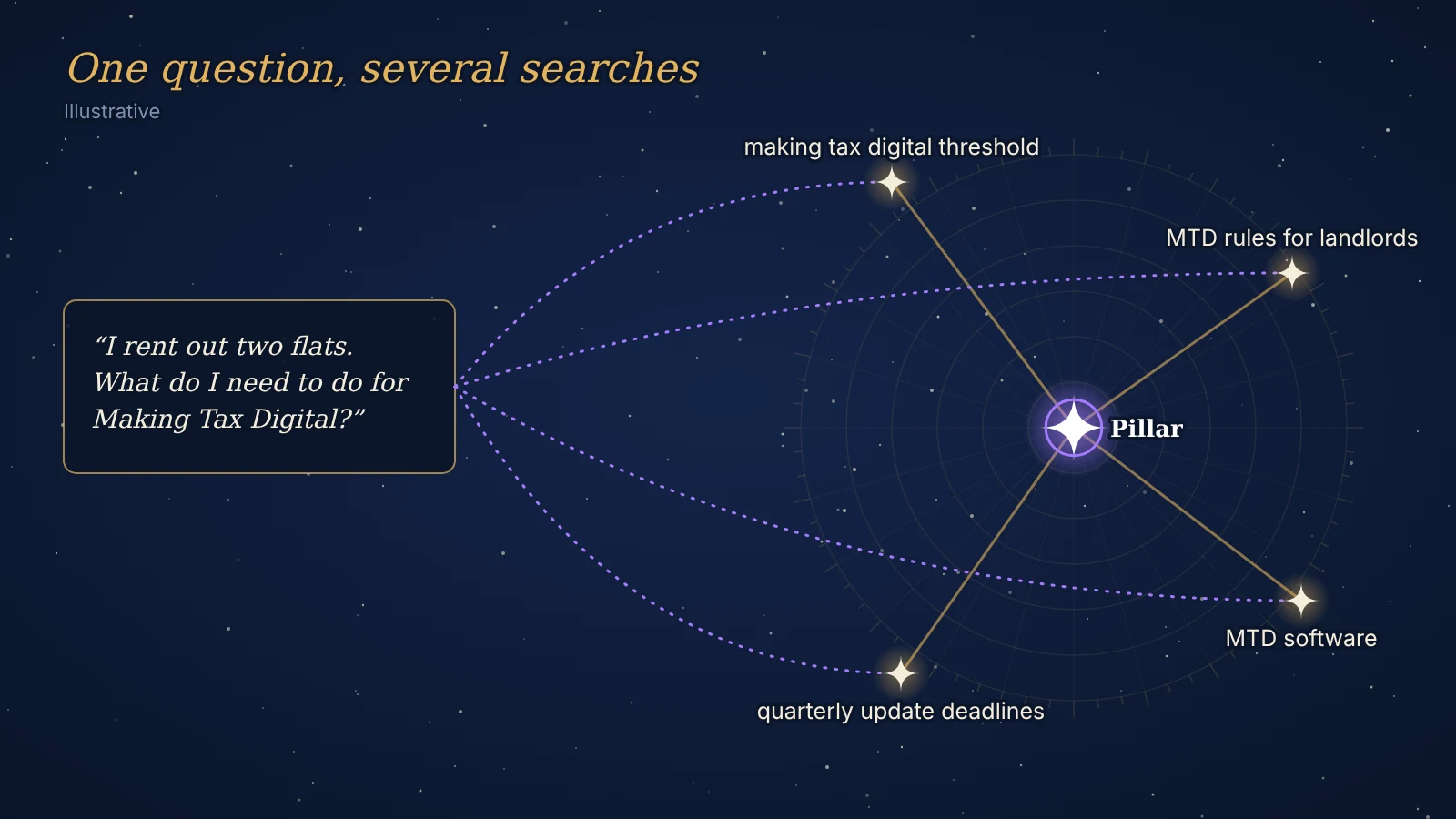
AI search makes clusters more useful, not less. Google’s documentation on AI features and your website says AI Overviews and AI Mode may use query fan-out: they run several related searches across subtopics and build one answer from what comes back. A question such as “I rent out two flats, what do I need to do for Making Tax Digital?” can turn into separate searches about thresholds, landlord rules, software and deadlines.
A site with a pillar and a well-linked set of cluster pages has a strong answer ready for each of those sub-searches, which gives it more chances to be cited. The guide to how Google AI Mode works shows the process in more detail, and generative engine optimisation covers the wider set of signals AI tools use when choosing sources.
Each cluster page should therefore open with a direct answer to its question, use clear headings and put comparisons in tables. To see whether your pillar and cluster pages are structured in a way AI tools can read, run them through the AI Readiness Checker, which checks page structure, question formats, lists, tables and structured data.
How to measure a topic cluster
Judge a cluster as a group, not page by page. A new cluster page may take weeks to gain traffic, while the pillar may start ranking for more queries because of it. In Google Search Console, filter the Performance report by page, using the shared folder or a regular expression that matches the cluster’s URLs, and track four things each quarter:
- Clicks and impressions for the whole cluster, compared with the same period last year.
- The number of different queries the cluster appears for. A growing number shows the subject coverage is being recognised.
- Queries landing on the wrong page, such as a cluster question answered by the pillar. That usually means the cluster page is weak or the anchor text pointing to it is unclear.
- Enquiries or sales from cluster pages, from the landing page report in your analytics, so the cluster is judged on the business goal and not only on traffic.
Review each cluster once or twice a year. Update the facts, add pages for new questions and merge cluster pages that turned out to answer the same thing, following the keep, update, merge or remove rules of a content audit.
Frequently asked questions
What is a topic cluster?
A topic cluster is a group of pages on one subject: a pillar page that covers the subject broadly and several cluster pages that each answer one narrower question in depth, all joined by internal links in both directions.
What is a pillar page?
A pillar page is the main overview of a subject on your site. It targets the broad search term, covers each part of the subject briefly and links to the cluster pages that go into detail.
What is the difference between a pillar page and a cluster page?
A pillar page covers a whole subject at overview level and targets the broad term. A cluster page covers one specific question or task in depth, targets a narrower query and links back to the pillar.
How many cluster pages should a pillar page have?
There is no fixed number. A cluster needs one page for each distinct question that has its own search intent and enough to say; smaller questions are better as sections of the pillar or FAQ answers.
Are topic clusters still relevant for SEO?
Yes. Internal links still help Google understand and find pages, and AI search tools that split one question into several sub-searches are more likely to find a strong answer on a site that covers a subject through linked pages.
Are content pillars the same as topic clusters?
Not quite. On social media, content pillars are the recurring themes a brand posts about, explained in social media content strategy. In SEO, a pillar page is the central page of a topic cluster on your website.
On this page
Back to topTurn your core topics into clusters
Kutola helps businesses choose the topics worth owning, map them into pillar and cluster pages and plan the links between them, so new content builds on what is already there. Get in touch to plan your first cluster.